Back to Marketplace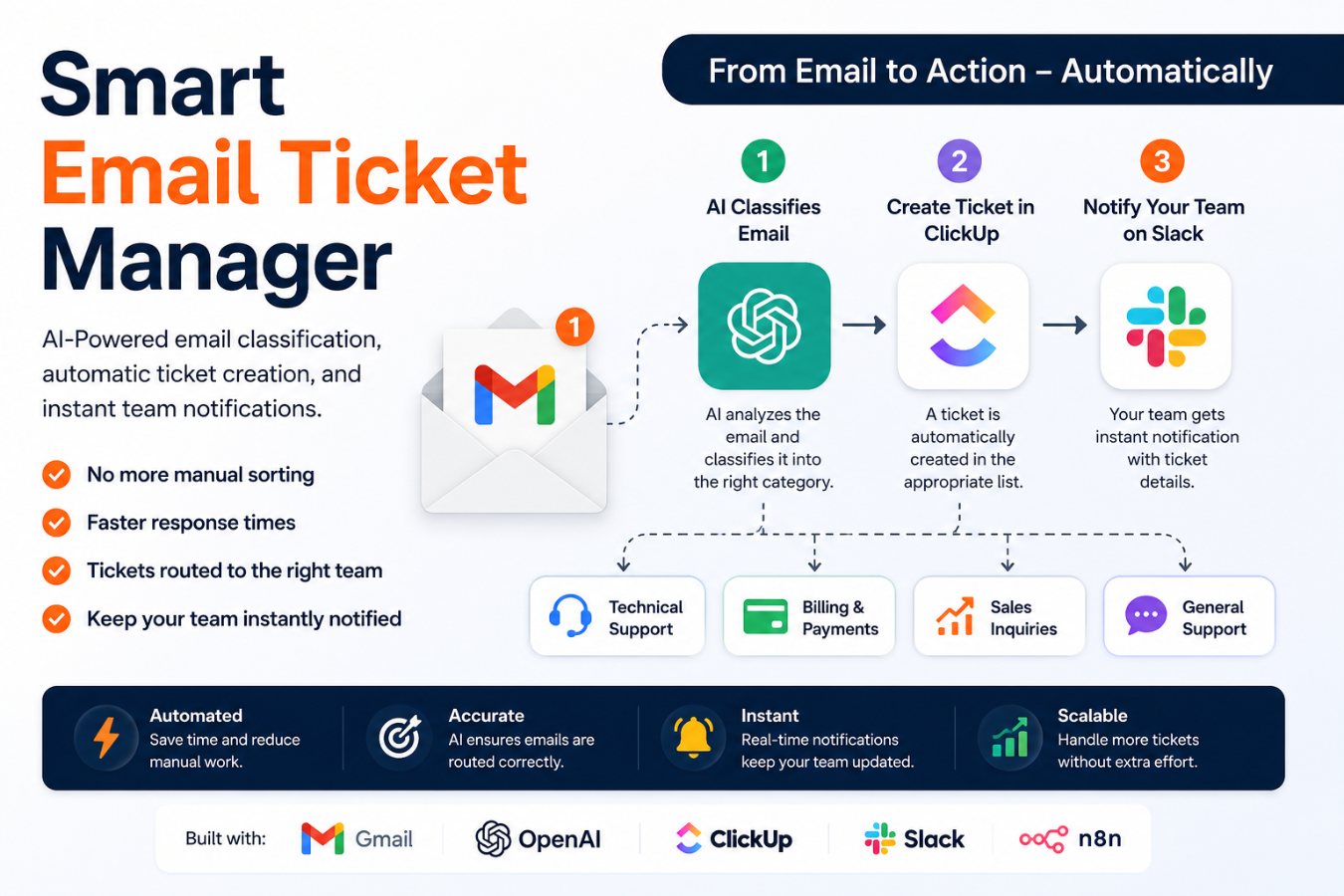
n8n
Automation
Moderate
Email to Support Ticket Automation
Automatically classify incoming support emails, create tickets in the right queue, and notify your team instantly—no manual sorting required
4 views0 likes0 downloads
What this Automation automation does
Stop manually sorting support emails. This automation intelligently classifies incoming Gmail messages using AI, creates a ticket in the correct ClickUp list, and instantly notifies your team in Slack.
Perfect for customer support teams, agencies, SaaS businesses, and service providers looking to reduce response times and eliminate manual triage.
How it works:
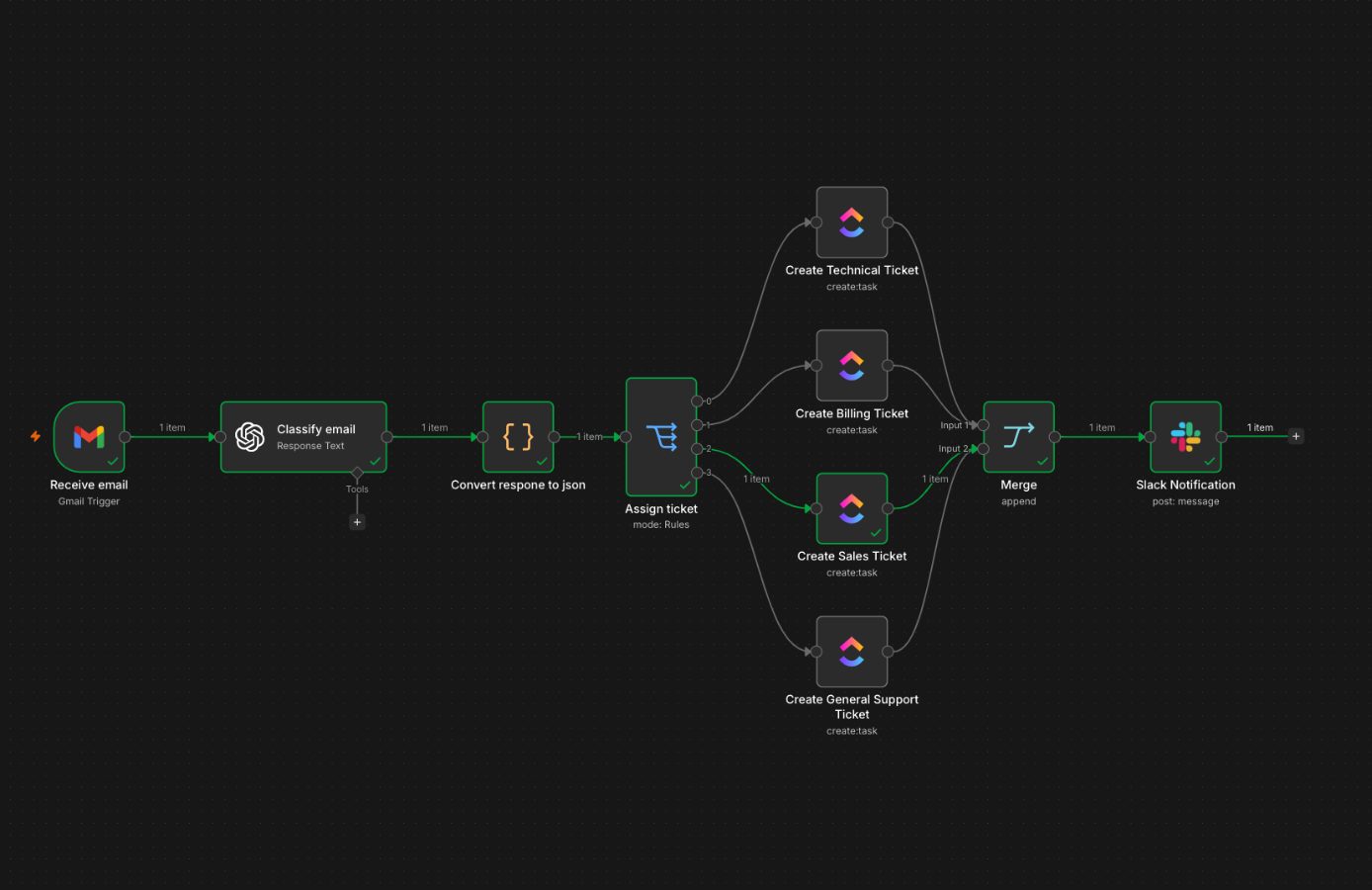
📥 Monitors a Gmail inbox for new emails
🤖 Uses AI to classify each email into:
Technical Support
Billing & Payments
Sales Inquiry
General Support
📋 Automatically creates a task in the appropriate ClickUp list
💬 Sends a Slack notification with the newly created ticket details
⚡ Ensures every customer request reaches the right team without manual intervention
Key Benefits
Reduce manual ticket sorting
Faster response times
Eliminate routing errors
Keep your support team instantly informed
Scale customer support without increasing admin work
Apps Used
Gmail
OpenAI
ClickUp
Slack
Ideal For
Customer Support Teams
SaaS Companies
Marketing Agencies
IT Service Providers
E-commerce Businesses
Virtual Assistants
Businesses handling high email volumes
Before running, configure the following n8n credentials: Gmail OAuth2 (for the Gmail trigger), Open Ai Api (OpenAI API key/credential), Click Up OAuth2 Api (ClickUp access), and Slack OAuth2 Api (Slack access). In n8n, set the Gmail trigger filter/label you want to monitor, choose the ClickUp workspace/project/list where tasks should be created, and specify the Slack channel for notifications. Ensure each OAuth credential has the necessary scopes and that your OpenAI credential is set to use the intended model; n8n 1.20+ is required to run this workflow.
Connected tools and integrations
email triage
gmail
ai
clickup
slack
Use cases for this Automation workflow
- Automatically create ClickUp tasks for incoming emails classified as actionable by the AI.
- Post concise AI-generated summaries or alerts about important emails to a Slack channel.
- Classify and route emails into different flows (urgent
- follow-up
- archive) based on AI analysis.
What the n8n service includes
Included in the offer
- Monitoring of the agreed automation - Fixes after third-party API changes - Minor evolutions within the agreed scope - Messaging support with the announced SLA - Periodic report
Not included
- Redesigns, major new use cases, or new integrations unless quoted separately - n8n hosting, third-party subscriptions, API usage, or infrastructure costs - Primary passwords, permanent access, or credential storage by FlowMarket
Buyer prerequisites
Before running, configure the following n8n credentials: Gmail OAuth2 (for the Gmail trigger), Open Ai Api (OpenAI API key/credential), Click Up OAuth2 Api (ClickUp access), and Slack OAuth2 Api (Slack access). In n8n, set the Gmail trigger filter/label you want to monitor, choose the ClickUp workspace/project/list where tasks should be created, and specify the Slack channel for notifications. Ensure each OAuth credential has the necessary scopes and that your OpenAI credential is set to use the intended model; n8n 1.20+ is required to run this workflow.
Required access
Recommended n8n version: n8n 1.20+ Node count: 10 Detected APIs / services: ClickUp, Slack, OpenAI, Gmail Required credentials: Click Up OAuth2 Api, Slack OAuth2 Api, Open Ai Api, Gmail OAuth2 Triggers: Gmail
FlowMarket facilitates the connection and payment. The service contract is between you and the seller, who remains solely responsible for delivery and outcome.
A help / installation guide is included — available after purchase.
Customer reviews of this Automation automation
No reviews yet.
More Automation automations
PDF Invoice to Accounting System Automation
Processing of invoice documents sent through gmail
Free
AI-Powered Lead Capture & Qualification System
When a new lead submits a form on your website, this automation instantly creates or updates their contact record in your CRM and sends real-time email and SMS notifications to your sales team.
Free
Free n8n Client Handoff Settings and Change Log Template
A free n8n companion workflow that gives clients a safe settings block, change log entry, and handoff checklist before delivery.
Free
Ready-to-import JSON workflowFree
Instant purchase: get the n8n file to import. An instruction file is also included.
Assisted installation€50.00
The creator installs, configures and tests the workflow on your n8n environment.
Complete workflow setup App connections and authentication Customization to your business processes AI prompt and routing configuration ClickUp and Slack setup End-to-end testing and verification Installation support and troubleshooting
Setup guideMonthly maintenance€25.00/mois
-Bug fixes and issue resolution -Workflow health checks -API connection troubleshooting -Credential and authentication updates -Minor workflow adjustments -Prompt optimization for improved AI accuracy -Support for app integration issues -Performance monitoring and optimization -Compatibility updates following minor app changes -Email and messaging support during the maintenance period
Optional: it will be billed separately after installation validation, only if you activate it.
Maintenance guideSign in to order in a few clicks.
Automation typeAutomation
LevelModerate
Downloads0
What you can get
The JSON file can give you a concrete base: automation logic and an n8n template when available.
With installation, the creator adapts the workflow to your tools, access needs and business rules.
If the need goes beyond a ready-to-import base, request a custom service or maintenance.