
Welcome Gemma 4: Frontier multimodal intelligence on device
- +884







The Gemma 4 family of multimodal models by Google DeepMind is out on Hugging Face, with support for your favorite agents, inference engines, and fine-tuning libraries 🤗
These models are the real deal: truly open with Apache 2 licenses, high quality with pareto frontier arena scores, multimodal including audio, and sizes you can use everywhere including on-device. Gemma 4 builds on advances from previous families and makes them click together. In our tests with pre-release checkpoints we have been impressed by their capabilities, to the extent that we struggled to find good fine-tuning examples because they are so good out of the box.
We collaborated with Google and the community to make them available everywhere: transformers, llama.cpp, MLX, WebGPU, Rust; you name it. This blog post will show you how to build with your favorite tools so let us know what you think!
Table of Contents
- What is New with Gemma 4?
- Overview of Capabilities and Architecture Architecture at a Glance
- Per-Layer Embeddings (PLE)
- Shared KV Cache
- transformers
- Llama.cpp
- Plug in to your local agent
- transformers.js
- MLX
- Mistral.rs
- Fine-tuning with TRL Fine-tuning with TRL on Vertex AI
What is new with Gemma 4?
Similar to Gemma-3n, Gemma 4 supports image, text, and audio inputs, and generates text responses. The text decoder is based on the Gemma model with support for long context windows. The image encoder is similar to the one from Gemma 3 but with two crucial improvements: variable aspect ratios, and configurable number of image token inputs to find your sweet spot between speed, memory, and quality. All models support images (or video) and text inputs, while the small variants (E2B and E4B) support audio as well.
Gemma 4 comes in four sizes, all base and instruction fine-tuned:
Overview of Capabilities and Architecture
Gemma 4 leverages several architecture components used in previous Gemma versions and other open models, and leaves out complex or inconclusive features such as Altup. The combination is a mix designed to be highly compatible across libraries and devices, that can efficiently support long context and agentic use cases, whilst being ideal for quantization.
As shown in the benchmarks above, this feature mix (combined with the training data and recipe) enables the 31B dense model to achieve an estimated LMArena score (text only) of 1452, while the 26B MoE reaches 1441 with just 4B active parameters 🤯. As we'll see, multimodal operation is comparatively as good as text generation, at least in informal and subjective tests.
These are the main architecture characteristics in Gemma 4:
- Alternating local sliding-window and global full-context attention layers. Smaller dense models use sliding windows of 512 tokens while larger models use 1024 tokens.
- Dual RoPE configurations: standard RoPE for sliding layers, pruned RoPE for global layers, to enable longer context.
- Per-Layer Embeddings (PLE) : a second embedding table that feeds a small residual signal into every decoder layer.
- Shared KV Cache : the last N layers of the model reuse key-value states from earlier layers, eliminating redundant KV projections.
- Vision encoder : uses learned 2D positions and multidimensional RoPE. Preserves the original aspect ratios and can encode images to a few different token budgets (70, 140, 280, 560, 1120).
- Audio encoder : USM-style conformer with the same base architecture as the one in Gemma-3n.
Per-Layer Embeddings (PLE)
One of the most distinctive features in smaller Gemma 4 models is Per-Layer Embeddings (PLE), which was introduced previously in Gemma-3n. In a standard transformer, each token gets a single embedding vector at input, and the same initial representation is what the residual stream builds on across all layers, forcing the embedding to frontload everything the model might need. PLE adds a parallel, lower-dimensional conditioning pathway alongside the main residual stream. For each token, it produces a small dedicated vector for every layer by combining two signals: a token-identity component (from an embedding lookup) and a context-aware component (from a learned projection of the main embeddings). Each decoder layer then uses its corresponding vector to modulate the hidden states via a lightweight residual block after attention and feed-forward. This gives each layer its own channel to receive token-specific information only when it becomes relevant, rather than requiring everything to be packed into a single upfront embedding. Because the PLE dimension is much smaller than the main hidden size, this adds meaningful per-layer specialization at modest parameter cost. For multimodal inputs (images, audio, video), PLE is computed before soft tokens are merged into the embedding sequence — since PLE relies on token IDs that are lost once multimodal features replace the placeholders. Multimodal positions use the pad token ID, effectively receiving neutral per-layer signals.
Shared KV Cache
The shared KV cache is an efficiency optimization that reduces both compute and memory during inference. The last num_kv_shared_layers layers of the model don't compute their own key and value projections. Instead, they reuse the K and V tensors from the last non-shared layer of the same attention type (sliding or full).
In practice, this has a minimal impact on quality while being much more efficient (in terms of both memory and compute) for long context generation and on-device use.
Multimodal Capabilities
We saw in our tests that Gemma 4 supports comprehensive multimodal capabilities out of the box. We don't know what was the training mix, but we had success using it for tasks such as OCR, speech-to-text, object detection, or pointing. It also supports text-only and multimodal function calling, reasoning, code completion and correction.
Here, we show a few inference examples across different model sizes. You can run them conveniently with this notebook . We encourage you to try the demos and share them below this blog!
Object Detection and Pointing
GUI detection
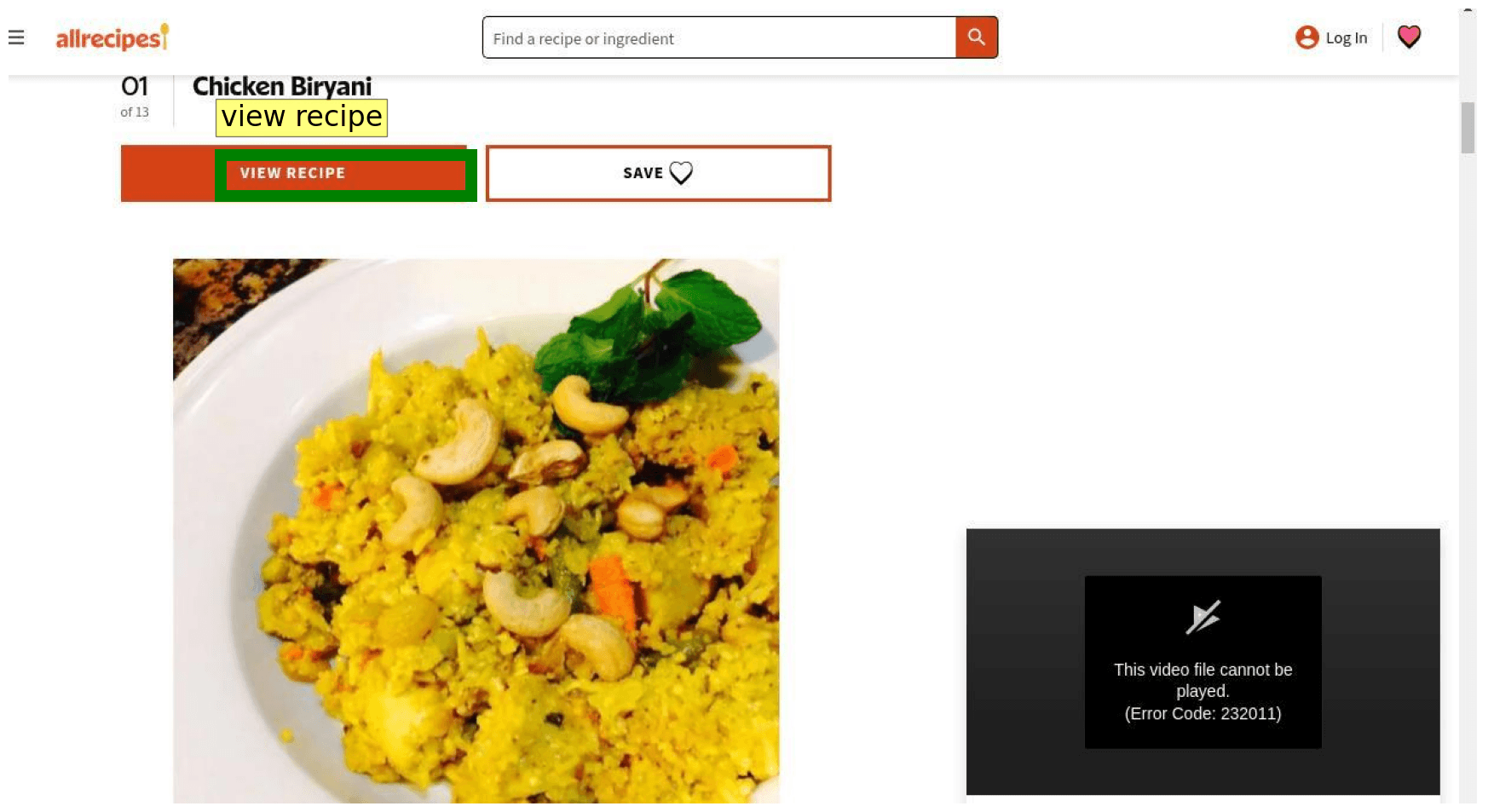
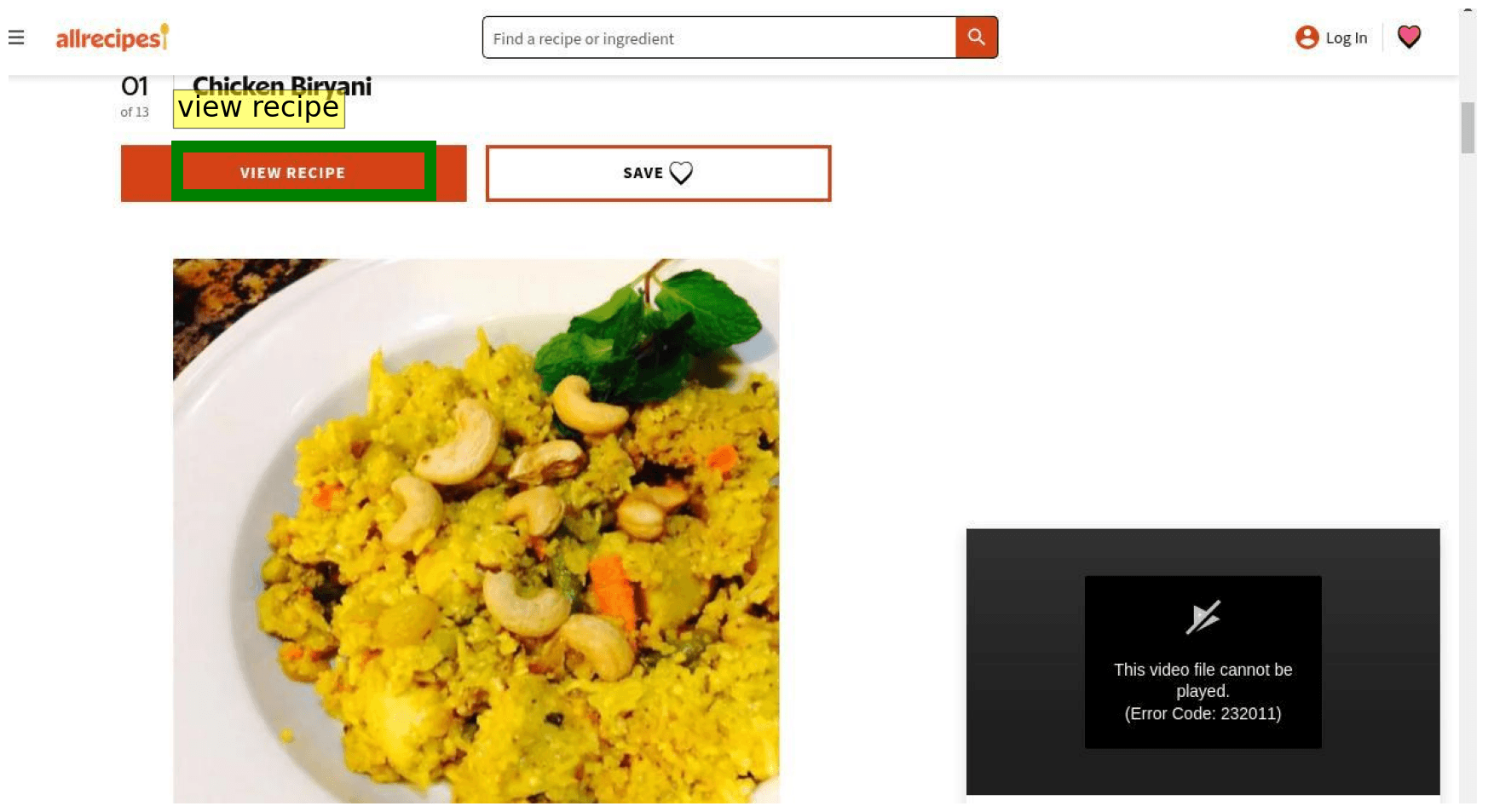
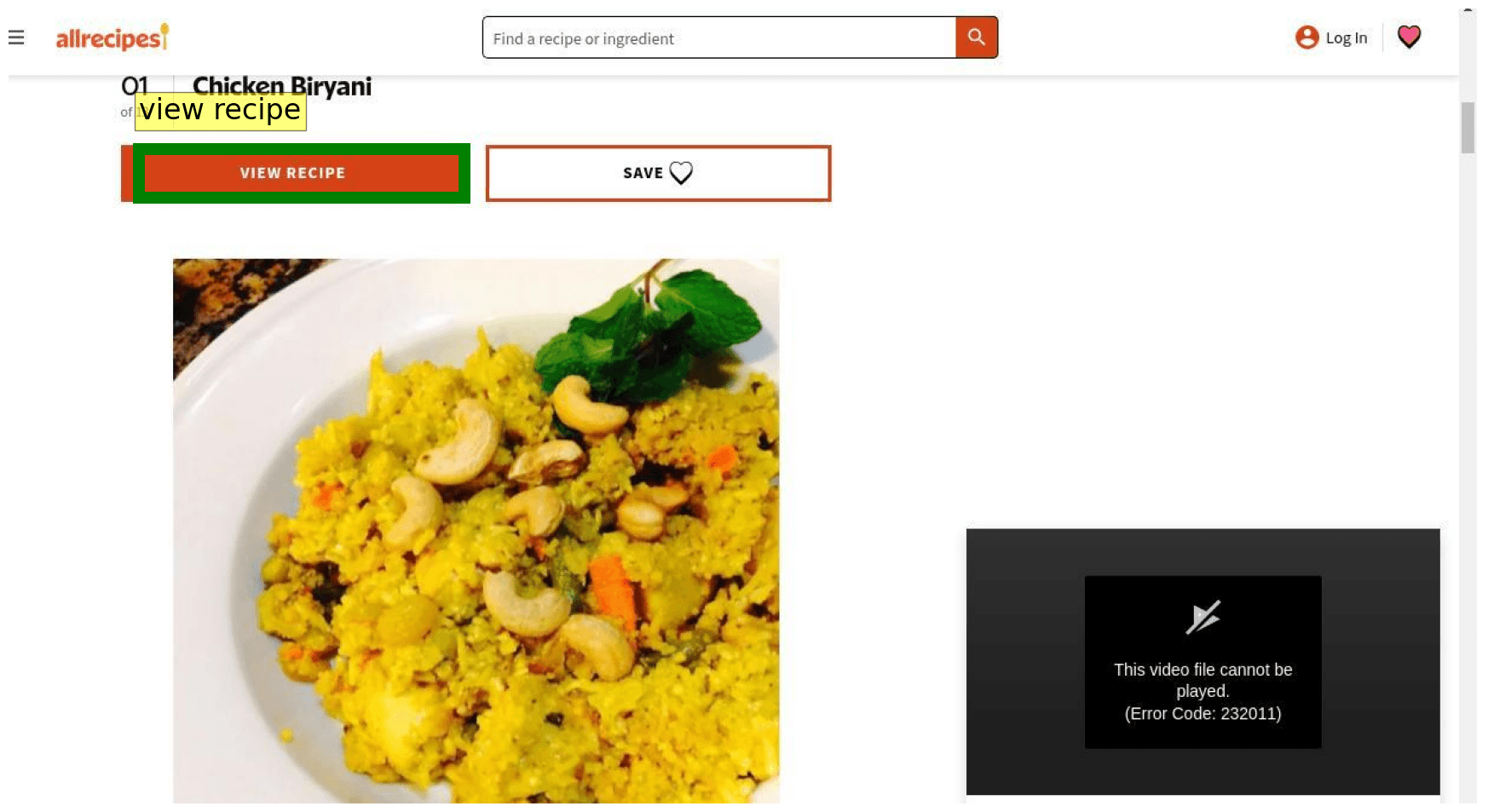
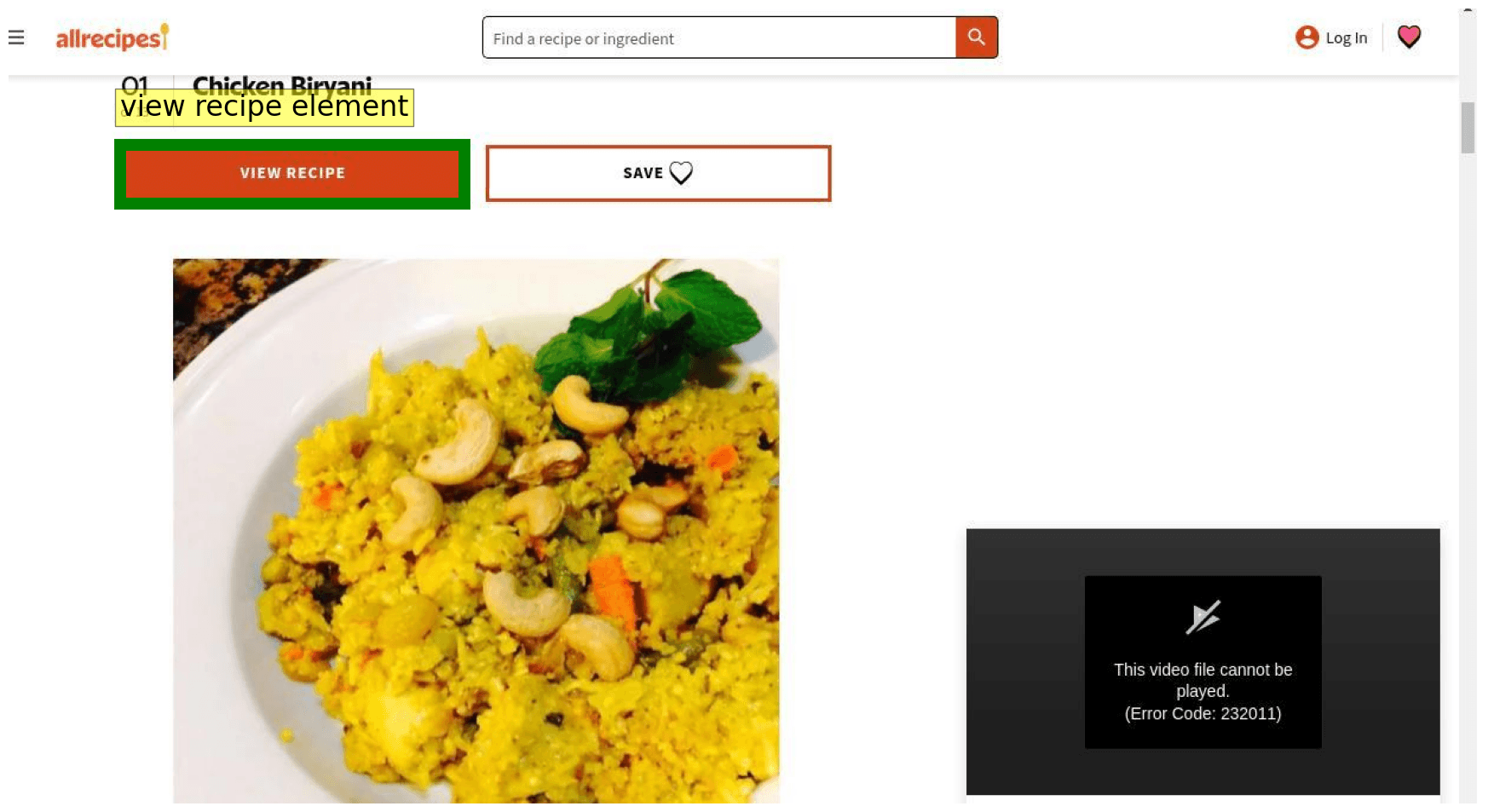
We test Gemma 4 on GUI element detection and pointing across different sizes, with the following image and text prompt: "What's the bounding box for the "view recipe" element in the image?"
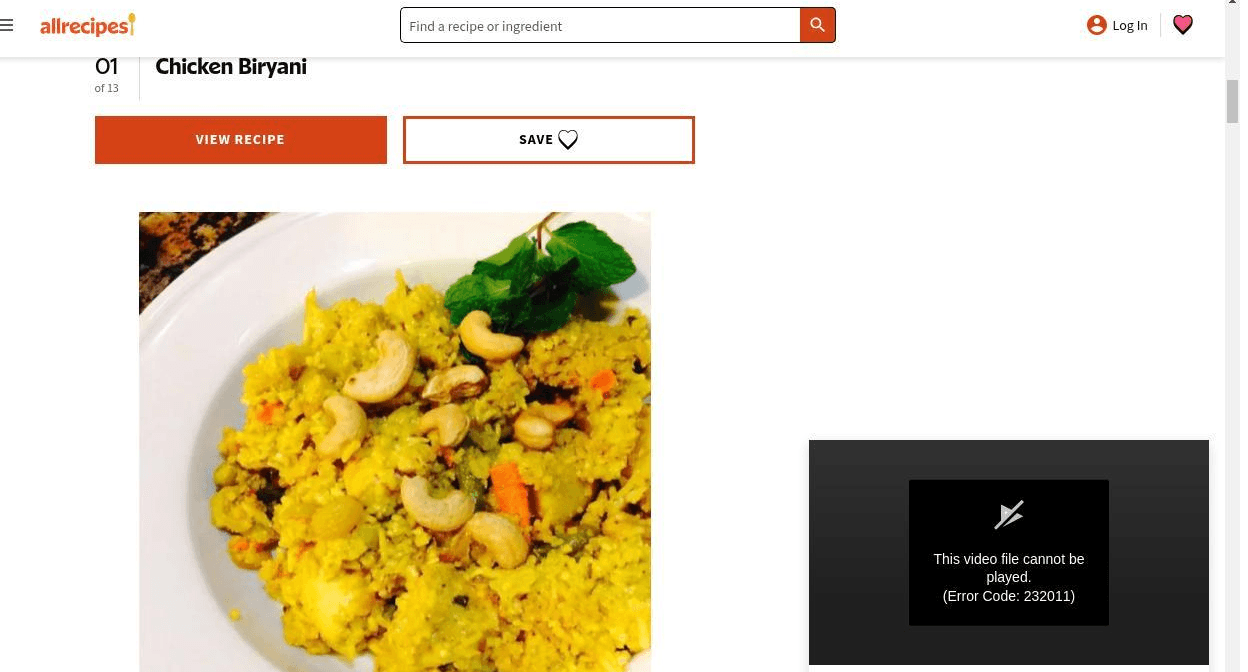
With this prompt, the model natively responds in JSON format with the detected bounding boxes - no need for specific instructions or grammar-constrained generation. We found the coordinates refer to an image size of 1000x1000, relative to the input dimensions.
We visualize the outputs below for your convenience. We parse the bounding boxes from the returned JSON: json\n[\n {"box_2d": [171, 75, 245, 308], "label": "view recipe element"}\n]\n
Object Detection
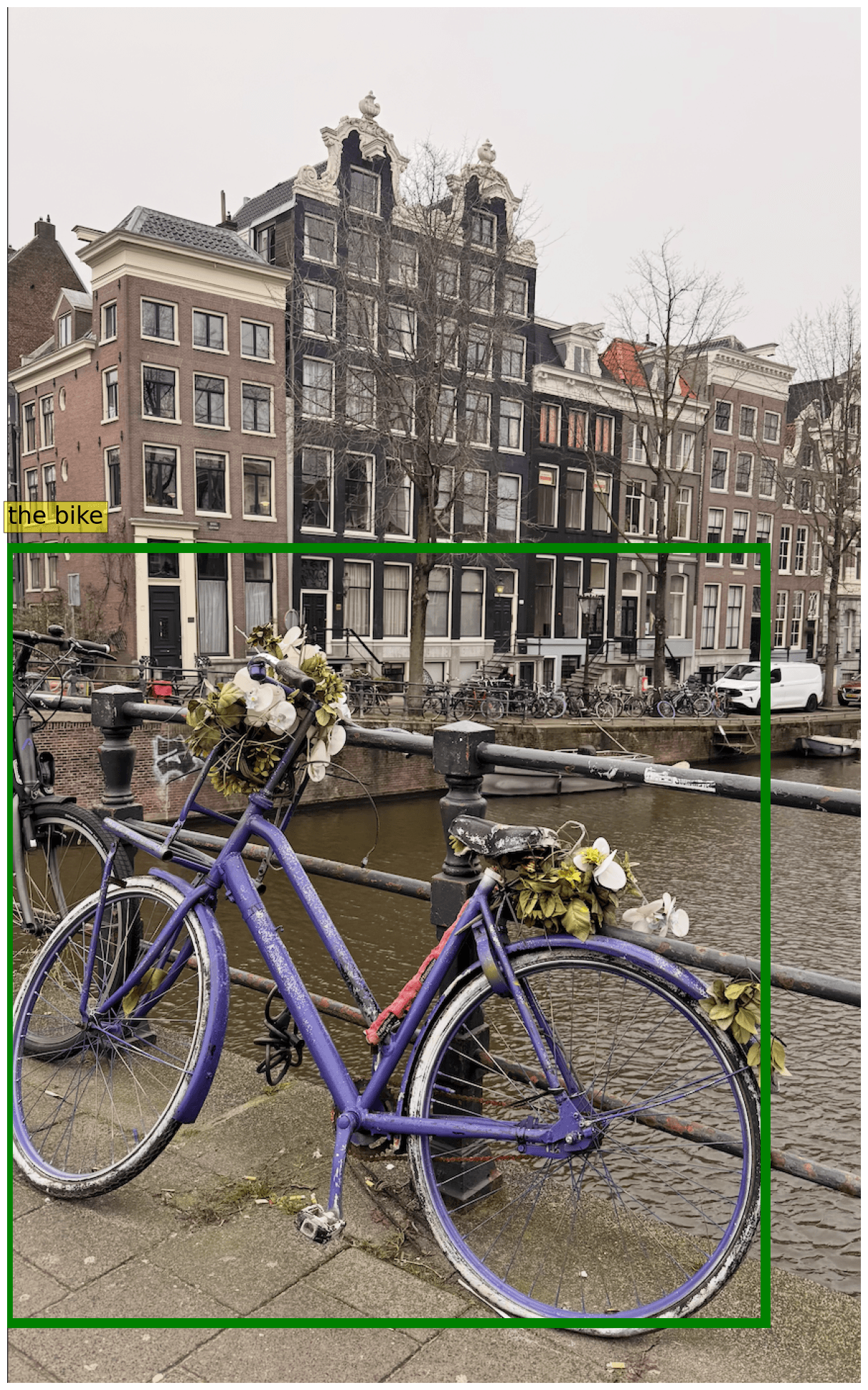
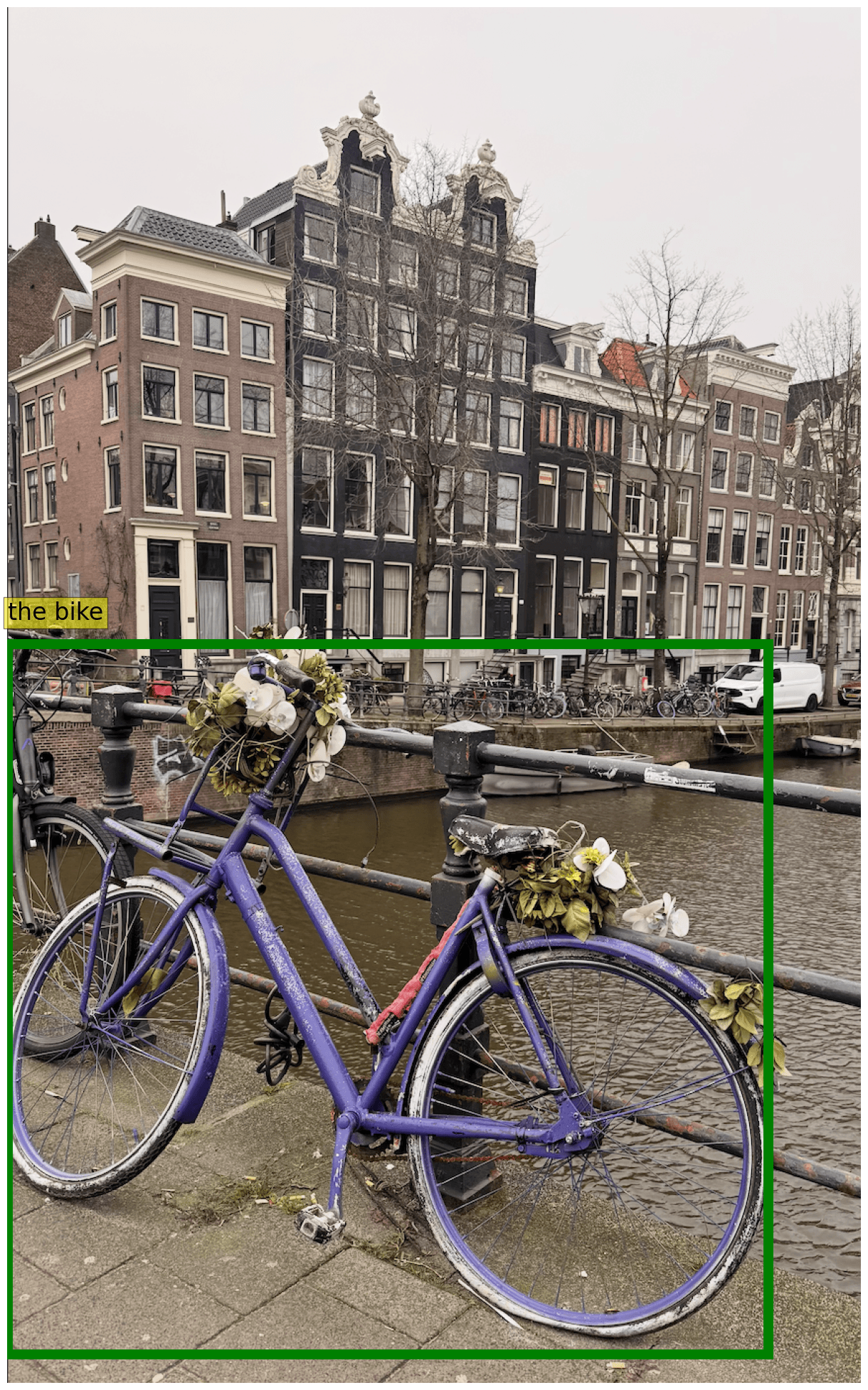
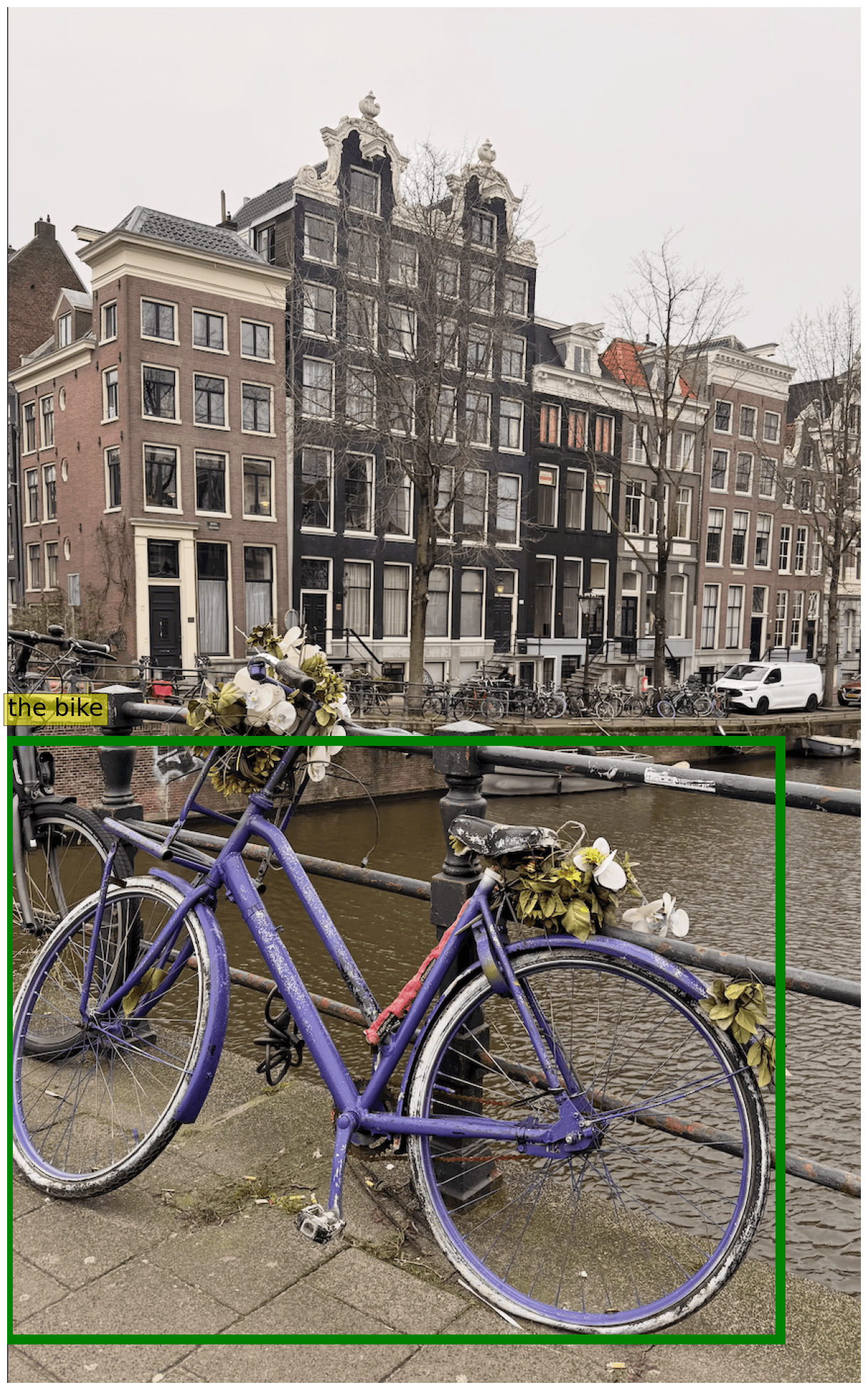
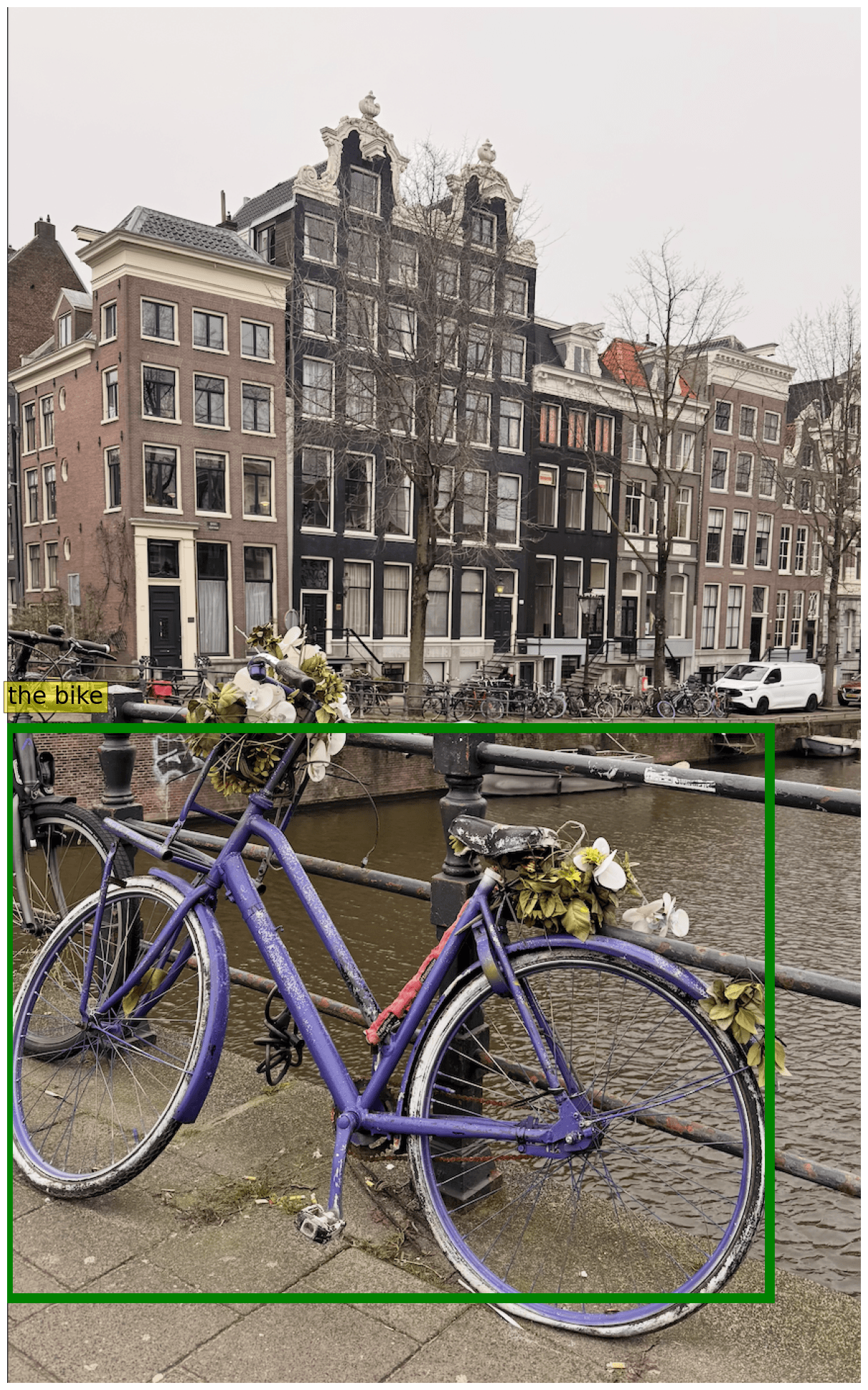
We test models to detect everyday objects, here we ask them to detect the bike and compare different model outputs. As in the previous case, we parse the bounding box from the json and translate to image space coordinates.
Multimodal Thinking and Function Calling
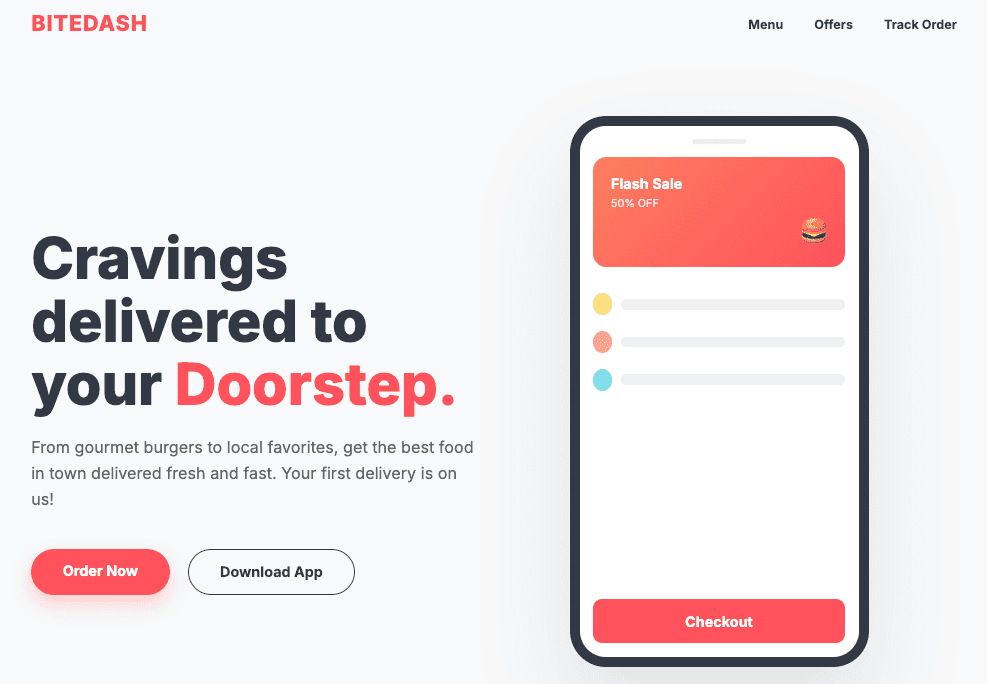
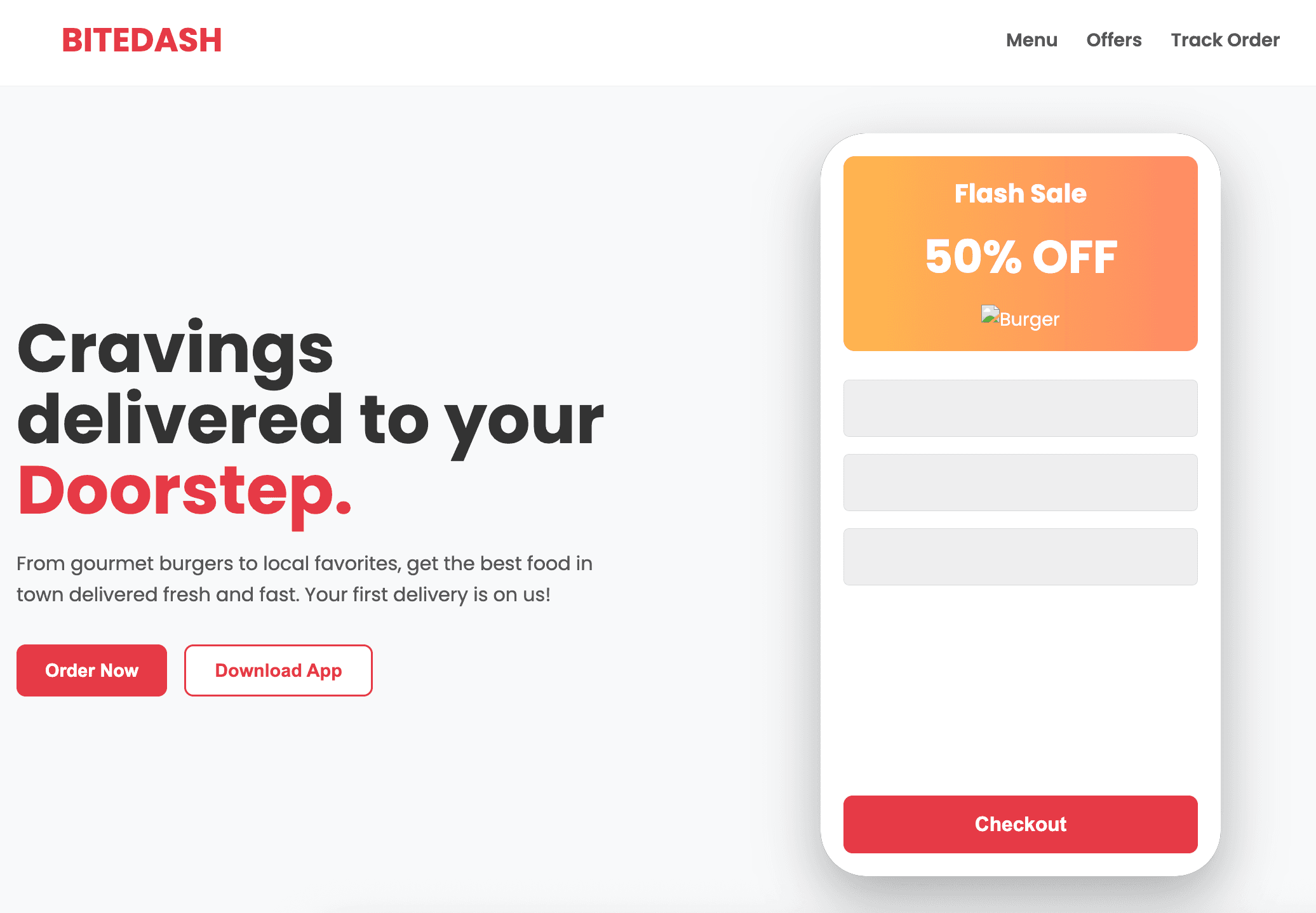
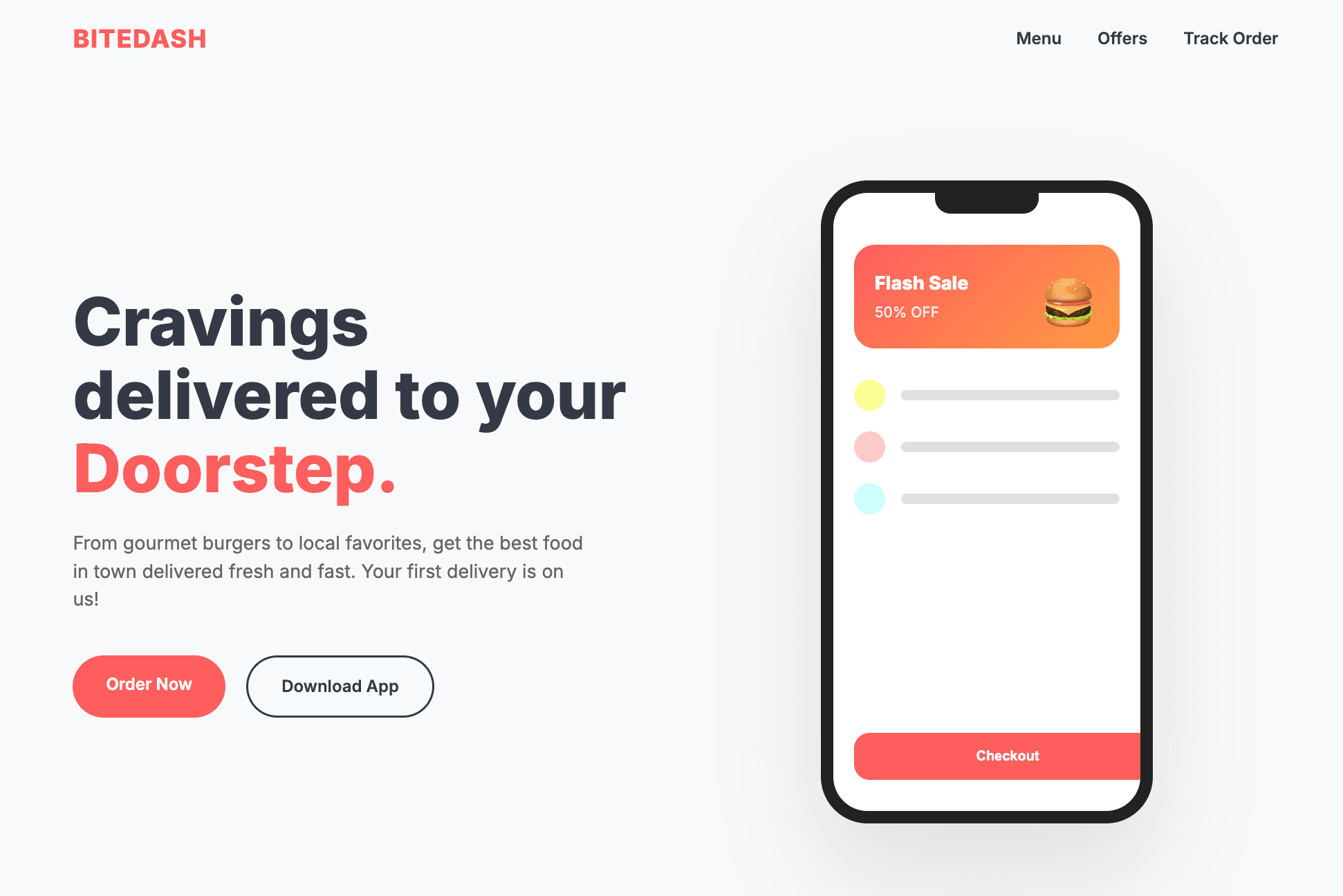
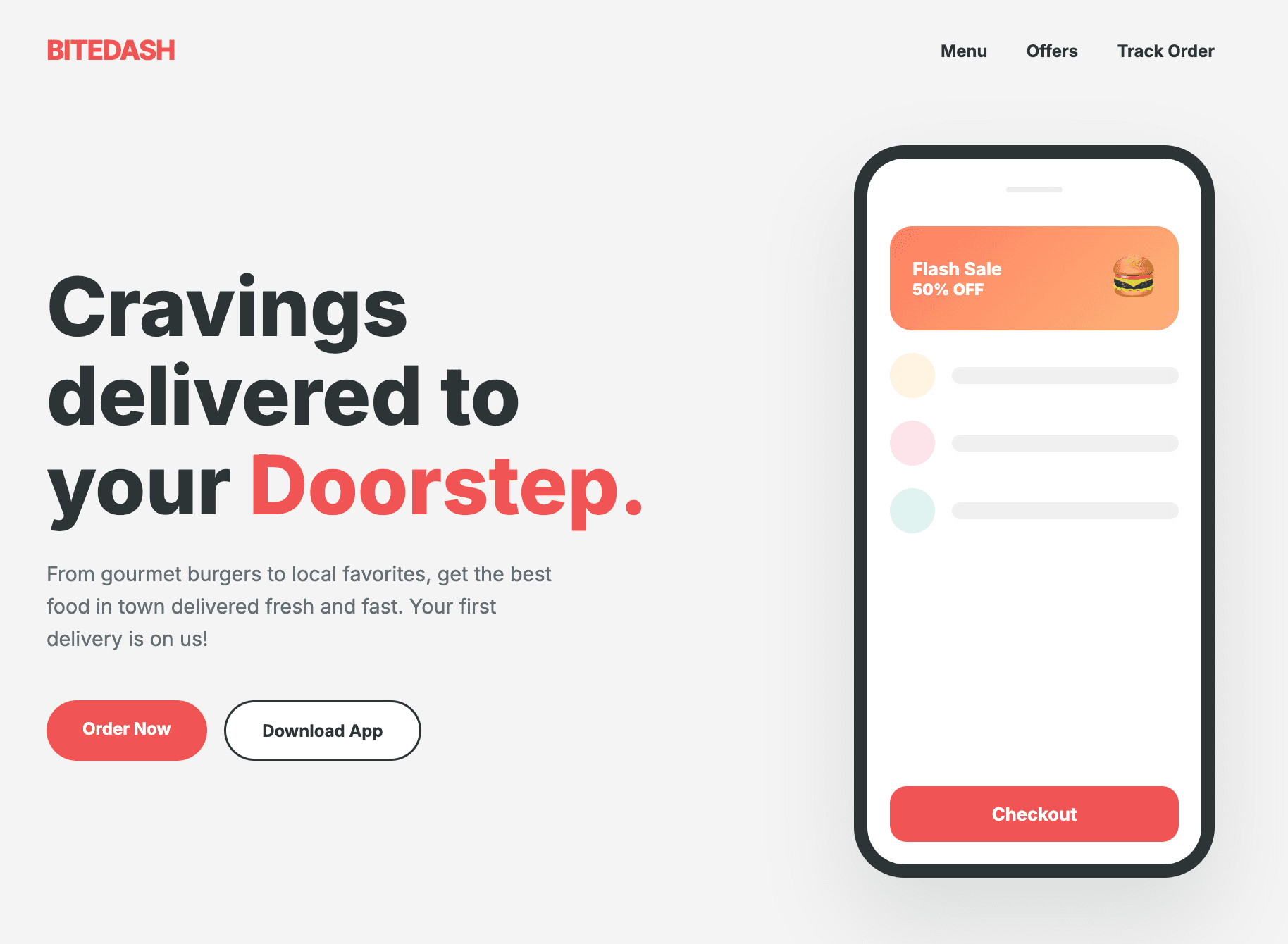
We asked Gemma 4 to write HTML code to reconstruct a page we made with Gemini 3. Below you can find the code to do this, we enable thinking and ask each model to generate up to 4000 new tokens, to make it foolproof.

messages = [
    {
        "role": "user",
        "content": [
            {
                "type": "image",
                "image": "https://huggingface.co/datasets/merve/vlm_test_images/resolve/main/landing_page.png",
            },
            {"type": "text", "text": "Write HTML code for this page."},
        ],
    }
]
inputs = processor.apply_chat_template(
    messages,
    tokenize=True,
    return_dict=True,
    return_tensors="pt",
    add_generation_prompt=True,
    enable_thinking=True,
).to(model.device)
output = model.generate(**inputs, max_new_tokens=4000)
input_len = inputs.input_ids.shape[-1]
generated_text_ids = output[0][input_len:]
generated_text = processor.decode(generated_text_ids, skip_special_tokens=True)
result = processor.parse_response(generated_text)
print(result["content"])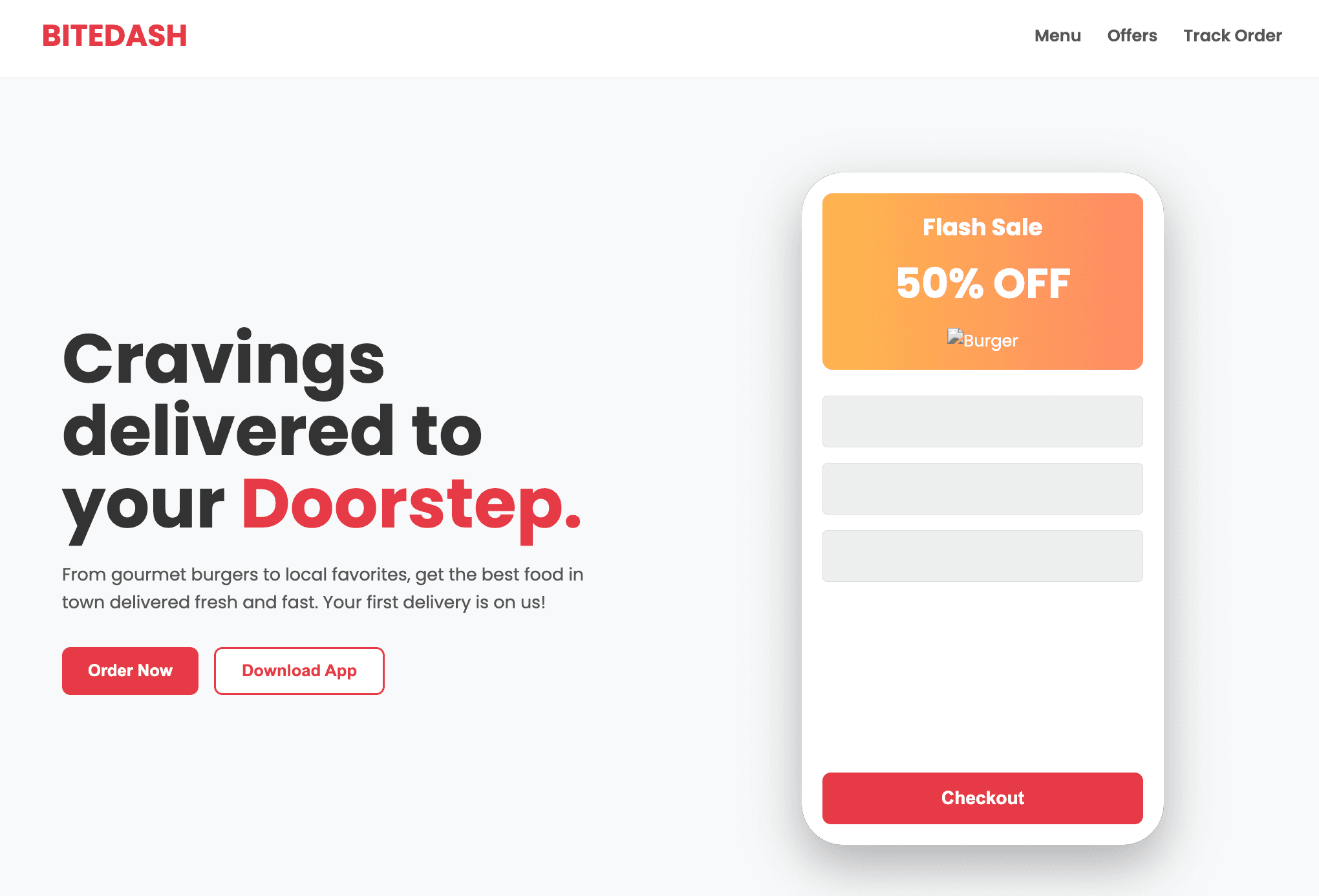
Video Understanding
Smaller Gemma 4 models can take in videos with audio while larger ones can take in videos without audio. While the models are not explicitly post-trained on videos, they can understand videos both with and without audio. The model is particularly strong in audios
messages = [
    {
        "role": "user",
        "content": [
            {"type": "video", "url": "https://huggingface.co/datasets/merve/vlm_test_images/resolve/main/concert.mp4"},
            {"type": "text", "text": "What is happening in the video? What is the song about?"},
        ],
    },
]
inputs = processor.apply_chat_template(
    messages,
    tokenize=True,
    return_dict=True,
    return_tensors="pt",
    add_generation_prompt=True,
    load_audio_from_video=True, # disable this for larger models
).to(model.device)
output = model.generate(**inputs, max_new_tokens=200)
input_len = inputs.input_ids.shape[-1]
generated_text_ids = output[0][input_len:]
generated_text = processor.decode(generated_text_ids, skip_special_tokens=True)
print(result["content"])
Captioning
We have tested all models on captioning. All checkpoints perform very well and accurately capture nuance in complex scenerios. Here's the image we use, with the prompt "Write single detailed caption for this image.".

messages = [
    {
        "role": "user",
        "content": [
            {"type": "image", "url": "https://huggingface.co/datasets/merve/vlm_test_images/resolve/main/bird.png"},
            {"type": "text", "text": "Write single detailed caption for this image."},
        ],
    },
]
inputs = processor.apply_chat_template(
    messages,
    tokenize=True,
    return_dict=True,
    return_tensors="pt",
    add_generation_prompt=True,
).to(model.device)
output = model.generate(**inputs, max_new_tokens=512)
input_len = inputs.input_ids.shape[-1]
generated_text_ids = output[0][input_len:]
generated_text = processor.decode(generated_text_ids, skip_special_tokens=True)
result = processor.parse_response(generated_text)
print(result["content"])
Audio Question Answering
These models are trained to answer questions about speech in audio. Music and non-speech sounds were not part of the training data.
messages = [
    {
        "role": "user",
        "content": [
            {"type": "audio", "url": "https://huggingface.co/datasets/hf-internal-testing/dummy-audio-samples/resolve/main/obama_first_45_secs.mp3"},
            {"type": "text", "text": "Can you describe this audio in detail?"},
        ],
    },
]

inputs = processor.apply_chat_template(
    messages,
    tokenize=True,
    return_dict=True,
    return_tensors="pt",
    add_generation_prompt=True,
).to(model.device)

output = model.generate(
    **inputs,
    max_new_tokens=1000,
    do_sample=False,
)

print(processor.decode(output[0], skip_special_tokens=True))
Here is an example if you want to do transcription:
messages = [
    {
        "role": "user",
        "content": [
            {"type": "audio", "url": "https://huggingface.co/datasets/hf-internal-testing/dummy-audio-samples/resolve/main/obama_first_45_secs.mp3"},
            {"type": "text", "text": "Transcribe the audio?"},
        ],
    },
]

inputs = processor.apply_chat_template(
    messages,
    tokenize=True,
    return_dict=True,
    return_tensors="pt",
    add_generation_prompt=True,
).to(model.device)

output = model.generate(
    **inputs,
    max_new_tokens=1000,
    do_sample=False,
)

print(processor.decode(output[0], skip_special_tokens=True))
Multimodal Function Calling
We test the model by asking to get the weather in the place shown in the image.
import re
WEATHER_TOOL = {
    "type": "function",
    "function": {
        "name": "get_weather",
        "description": "Gets the current weather for a specific location.",
        "parameters": {
            "type": "object",
            "properties": {
                "city": {"type": "string", "description": "The city name"},
            },
            "required": ["city"],
        },
    },
}
tools = [WEATHER_TOOL]
messages = [
    {"role": "user", "content": [
          {"type": "text", "text": "What is the city in this image? Check the weather there right now."},

        {"type": "image", "image": "https://huggingface.co/datasets/merve/vlm_test_images/resolve/main/thailand.jpg"},
    ]},
]
inputs = processor.apply_chat_template(
    messages,
    tools=[WEATHER_TOOL],
    tokenize=True,
    return_dict=True,
    return_tensors="pt",
    add_generation_prompt=True,
    enable_thinking=True,
).to(model.device)
output = model.generate(**inputs, max_new_tokens=1000)
input_len = inputs.input_ids.shape[-1]
generated_text_ids = output[0][input_len:]
generated_text = processor.decode(generated_text_ids, skip_special_tokens=True)
result = processor.parse_response(generated_text)
print(result["content"])
Deploy Anywhere
Gemma 4 comes with day-0 support for many open-source inference engines, and is ideal for tool calling and agents! We also release ONNX checkpoints that can run on many hardware backends, allowing use cases on edge devices or in browser!
transformers
Gemma 4 comes with first-class transformers support from the get-go 🤗. This integration allows using the model with other libraries like bitsandbytes, PEFT and TRL. Make sure to install the latest version of transformers.
pip install -U transformersThe easiest way to infer with the small Gemma 4 models is through the any-to-any pipeline. You can initialize it as follows.
from transformers import pipeline
pipe = pipeline("any-to-any", model="google/gemma-4-e2b-it")
You can then pass in images and text as follows.
messages = [
    {
        "role": "user",
        "content": [
            {
                "type": "image",
                "image": "https://huggingface.co/datasets/merve/vlm_test_images/resolve/main/thailand.jpg",
            },
            {"type": "text", "text": "Do you have travel advice going to here?"},
        ],
    }
]
output = pipe(messages, max_new_tokens=100, return_full_text=False)
output[0]["generated_text"]
# Based on the image, which appears to show a magnificent, ornate **Buddhist temple or pagoda**, likely in Southeast Asia (such as Thailand, Myanmar, or Cambodia), here is some general travel advice..
When inferring with videos, you can include the audio track using the load_audio_from_video argument.
messages = [
    {
        "role": "user",
        "content": [
            {
                "type": "video",
                "image": "https://huggingface.co/datasets/merve/vlm_test_images/resolve/main/rockets.mp4",
            },
            {"type": "text", "text": "What is happening in this video?"},
        ],
    }
]
pipe(messages, load_audio_from_video=True)
Going a level lower, you can load Gemma 4 using the AutoModelForMultimodalLM class, especially useful for fine-tuning. The built-in chat template takes care of formatting the inputs correctly, please make sure you use it to prevent subtle mistakes when building the prompt manually.
from transformers import AutoModelForMultimodalLM, AutoProcessor
model = AutoModelForMultimodalLM.from_pretrained("google/gemma-4-E2B-it", device_map="auto")
processor = AutoProcessor.from_pretrained("google/gemma-4-E2B-it")
messages = [
    {
        "role": "user",
        "content": [
            {
                "type": "video",
                "image": "https://huggingface.co/datasets/merve/vlm_test_images/resolve/main/rockets.mp4",
            },
            {"type": "text", "text": "What is happening in this video?"},
        ],
    }
]
inputs = processor.apply_chat_template(
    messages,
    tokenize=True,
    add_generation_prompt=True,
    return_dict=True,
    return_tensors="pt"
).to(model.device)

generated_ids = model.generate(**inputs, max_new_tokens=128)
generated_ids_trimmed = [
    out_ids[len(in_ids) :] for in_ids, out_ids in zip(inputs.input_ids, generated_ids)
]
output_text = processor.batch_decode(
    generated_ids_trimmed, skip_special_tokens=True, clean_up_tokenization_spaces=False
)
print(output_text)
Llama.cpp
Gemma 4 models come with image+text support in llama.cpp from the get-go! This unlocks using Gemma 4 with all of your favorite local apps: llama-cpp server, lmstudio, Jan as well as coding agents like Pi across many backends such as Metal and CUDA.
You can install llama-cpp as follows.
brew install llama.cpp # MacOS
winget install llama.cpp # Windows
You can then start a server compatible with the OpenAI API Replace the quantization scheme at the end of the command with the precision of your choice.
llama-server -hf ggml-org/gemma-4-E2B-it-GGUFCheck out this link for more options on combining llama.cpp with different coding agents and local apps. Find all the GGUF checkpoints in this collection .
Plug in your local agent
We worked on making sure the new models work locally with agents like openclaw, hermes, pi, and open code . All thanks to llama.cpp! Run the following to try Gemma 4 right away.
First, start your local server:
llama-server -hf ggml-org/gemma-4-26b-a4b-it-GGUF:Q4_K_MFor hermes:
hermes modelFor openclaw:
openclaw onboardFor pi define a ~/.pi/agent/models.json :
{
  "providers": {
    "llama-cpp": {
      "baseUrl": "http://localhost:8080/v1",
      "api": "openai-completions",
      "apiKey": "none",
      "models": [
        {
          "id": "ggml-org-gemma-4-26b-4b-gguf"
        }
      ]
    }
  }
}
For open code define a ~/.config/opencode/opencode.json :
{
  "$schema": "https://opencode.ai/config.json",
  "provider": {
    "llama.cpp": {
      "npm": "@ai-sdk/openai-compatible",
      "name": "llama-server (local)",
      "options": {
        "baseURL": "http://127.0.0.1:8080/v1"
      },
      "models": {
        "gemma-4-26b-4b-it": {
          "name": "Gemma 4 (local)",
          "limit": {
            "context": 128000,
            "output": 8192
          }
        }
      }
    }
  }
}
transformers.js
transformers.js enables running Gemma 4 right inside browser. You can check out the model card to see text-only, image & text, audio & text inference in detail here . We also shipped a demo for you to test the model here .
MLX
Full multimodal support of Gemma 4 is available using the open-source mlx-vlm library . Here's how to ask the model to describe an image:
pip install -U mlx-vlmmlx_vlm.generate \
--model google/gemma-4-E4B-it \
--image https://huggingface.co/datasets/huggingface/documentation-images/resolve/0052a70beed5bf71b92610a43a52df6d286cd5f3/diffusers/rabbit.jpg \
--prompt "Describe this image in detail"mlx-vlm supports TurboQuant, which delivers the same accuracy as the uncompressed baseline while using ~4x less active memory and running a lot faster end-to-end. This makes long-context inference practical on Apple Silicon without sacrificing quality. Use it like this:
mlx_vlm.generate \
--model "mlx-community/gemma-4-26b-a4b-it-4bit" \
--prompt "Your prompt here" \
--kv-bits 3.5 \
--kv-quant-scheme turboquant
For audio examples and more details, please check the MLX collection .
Mistral.rs
mistral.rs is a Rust-native inference engine with day-0 Gemma 4 support across all modalities (text, image, video, audio) and builtin tool-calling and agentic functionality. Install mistral.rs:
curl --proto '=https' --tlsv1.2 -sSf https://raw.githubusercontent.com/EricLBuehler/mistral.rs/master/install.sh | sh # Linux/macOS

irm https://raw.githubusercontent.com/EricLBuehler/mistral.rs/master/install.ps1 | iex # Windows
You can then start an OpenAI-compatible HTTP server:
mistralrs serve mistralrs-community/gemma-4-E4B-it-UQFF --from-uqff 8Or, use interactive mode:
mistralrs run -m google/gemma-4-E4B-it --isq 8 --image image.png -i "Describe this image in detail."

mistralrs run -m google/gemma-4-E4B-it --isq 8 --audio audio.mp3 -i "Transcribe this fully."
Find all models here . Please, follow the instructions in the model cards for installation and inference guidelines.
Multi-Token Prediction Drafters
Google has released Multi-Token Prediction (MTP) drafters for the Gemma 4 family: small assistant models that accelerate inference via speculative decoding. The drafter proposes several future tokens at once, and the target model verifies them in a single forward pass. You get the same outputs as the target model, just faster — no quality loss, no changes to reasoning behaviour. Reported end-to-end speedups go up to ~3x depending on hardware, batch size, and workload.
Assistants are available for all four Gemma 4 sizes (E2B, E4B, 26B A4B, 31B). They share the KV cache with the target model to avoid recomputing context, and the smaller edge variants additionally use an embedder clustering trick to keep memory and compute low on-device.
Find the checkpoints in the Gemma 4 collection and the mlx-community collection .
Fine-tuning for all
Gemma 4 models are ideal for fine-tuning in your favorite tools and platforms and at any budget.
Fine-tuning with TRL
Gemma 4 is fully supported for fine-tuning with TRL. To celebrate, TRL has been upgraded with support for multimodal tool responses when interacting with environments, meaning models can now receive images back from tools during training, not just text.
To showcase this, we've built an example training script where Gemma 4 learns to drive in the CARLA simulator. The model sees the road through a camera, decides what to do and learns from the outcome. After training, it consistently changes lanes to avoid pedestrians. The same approach works for any task where a model needs to see and act: robotics, web browsing, or other interactive environments.
Get started:
# pip install git+https://github.com/huggingface/trl.git

python examples/scripts/openenv/carla_vlm_gemma.py \
    --env-urls https://sergiopaniego-carla-env.hf.space \
            https://sergiopaniego-carla-env-2.hf.space \
    --model google/gemma-4-E2B-it
Find the example here .
Fine-tuning with TRL on Vertex AI
Additionally, we have prepared an example on how to fine-tune Gemma 4 with TRL on Vertex AI using SFT, to showcase how to extend the function calling capabilities, whilst freezing both the vision and audio towers. The examples include how to build a custom Docker container with latest Transformers, TRL, etc. with CUDA support on Google Cloud, and how to run it via Vertex AI Serverless Training Jobs.
# pip install google-cloud-aiplatform --upgrade --quiet
from google.cloud import aiplatform

aiplatform.init(
    project="<PROJECT_ID>",
    location="<LOCATION>",
    staging_bucket="<BUCKET_URI>",
)

job = aiplatform.CustomContainerTrainingJob(
    display_name="gemma-4-fine-tuning",
    container_uri="<CONTAINER_URI>",
    command=["python", "/gcs/gemma-4-fine-tuning/train.py"],
)

job = job.submit(
    replica_count=1,
    machine_type="a3-highgpu-1g",
    accelerator_type="NVIDIA_H100_80GB",
    accelerator_count=1,
    base_output_dir="<BUCKET_URI>/output-dir",
    environment_variables={
        "MODEL_ID": "google/gemma-4-E2B-it",
        "HF_TOKEN": <HF_TOKEN>,
    },
    boot_disk_size_gb=500,
)
You can find the complete example in the "Hugging Face on Google Cloud" docs at https://hf.co/docs/google-cloud/examples/vertex-ai-notebooks-fine-tune-gemma-4 .
Fine-tuning with Unsloth Studio
If you want to fine tune and run a Gemma 4 model in a UI, try out Unsloth Studio . It runs locally or on Google Colab. First, install and start the app:
# install unsloth studio on MacOS, Linux, WSL
curl -fsSL https://unsloth.ai/install.sh | sh

# install unsloth studio on Windows
irm https://unsloth.ai/install.ps1 | iex

# launch unsloth studio
unsloth studio -H 0.0.0.0 -p 8888
# Search for for a Gemma 4 model like google/gemma-4-E2B-it