Fine-tuning MMS Adapter Models for Multi-Lingual ASR
- +21


New (06/2023) : This blog post is strongly inspired by "Fine-tuning XLS-R on Multi-Lingual ASR" and can be seen as an improved version of it.
Wav2Vec2 is a pretrained model for Automatic Speech Recognition (ASR) and was released in September 2020 by Alexei Baevski, Michael Auli, and Alex Conneau . Soon after the strong performance of Wav2Vec2 was demonstrated on one of the most popular English datasets for ASR, called LibriSpeech , Facebook AI presented two multi-lingual versions of Wav2Vec2, called XLSR and XLM-R , capable of recognising speech in up to 128 languages. XLSR stands for cross-lingual speech representations and refers to the model's ability to learn speech representations that are useful across multiple languages.
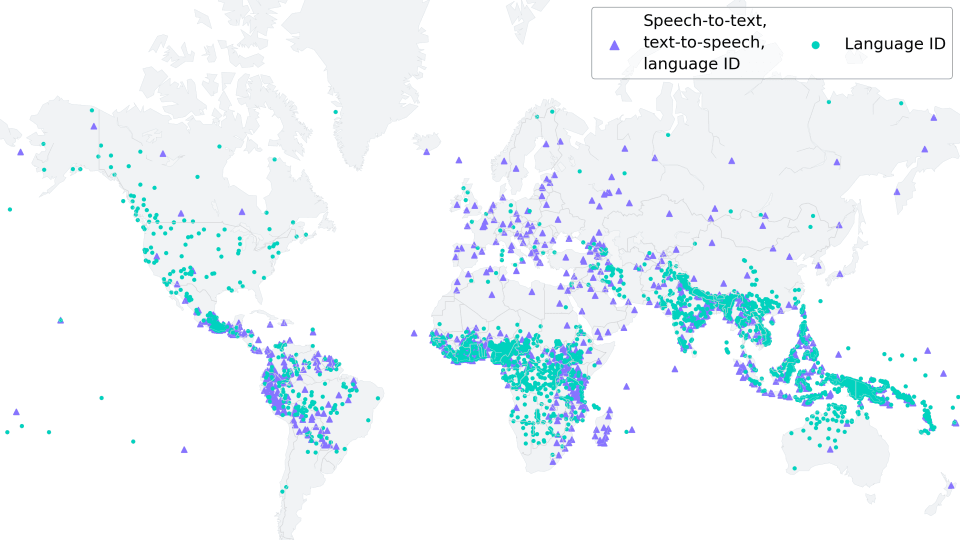
Meta AI's most recent release, Massive Multilingual Speech (MMS) by Vineel Pratap, Andros Tjandra, Bowen Shi, et al. takes multi-lingual speech representations to a new level. Over 1,100 spoken languages can be identified, transcribed and generated with the various language identification, speech recognition, and text-to-speech checkpoints released .
In this blog post, we show how MMS's Adapter training achieves astonishingly low word error rates after just 10-20 minutes of fine-tuning.
For low-resource languages, we strongly recommend using MMS' Adapter training as opposed to fine-tuning the whole model as is done in "Fine-tuning XLS-R on Multi-Lingual ASR" .
In our experiments, MMS' Adapter training is both more memory efficient, more robust and yields better performance for low-resource languages. For medium to high resource languages it can still be advantageous to fine-tune the whole checkpoint instead of using Adapter layers though.
Preserving the world's language diversity
According to https://www.ethnologue.com/ around 3000, or 40% of all "living" languages, are endangered due to fewer and fewer native speakers. This trend will only continue in an increasingly globalized world.
MMS is capable of transcribing many languages which are endangered, such as Ari or Kaivi . In the future, MMS can play a vital role in keeping languages alive by helping the remaining speakers to create written records and communicate in their native tongue.
To adapt to 1000+ different vocabularies, MMS uses of Adapters - a training method where only a small fraction of model weights are trained.
Adapter layers act like linguistic bridges, enabling the model to leverage knowledge from one language when deciphering another.
Fine-tuning MMS
MMS unsupervised checkpoints were pre-trained on more than half a million hours of audio in over 1,400 languages, ranging from 300 million to one billion parameters.
You can find the pretrained-only checkpoints on the 🤗 Hub for model sizes of 300 million parameters (300M) and one billion parameters (1B):
- mms-300m
- mms-1b
Note : If you want to fine-tune the base models, you can do so in the exact same way as shown in "Fine-tuning XLS-R on Multi-Lingual ASR" .
Similar to BERT's masked language modeling objective , MMS learns contextualized speech representations by randomly masking feature vectors before passing them to a transformer network during self-supervised pre-training.
For ASR, the pretrained MMS-1B checkpoint was further fine-tuned in a supervised fashion on 1000+ languages with a joint vocabulary output layer. As a final step, the joint vocabulary output layer was thrown away and language-specific adapter layers were kept instead. Each adapter layer contains just ~2.5M weights, consisting of small linear projection layers for each attention block as well as a language-specific vocabulary output layer.
Three MMS checkpoints fine-tuned for speech recognition (ASR) have been released. They include 102, 1107, and 1162 adapter weights respectively (one for each language):
- mms-1b-fl102
- mms-1b-l1107
- mms-1b-all
You can see that the base models are saved (as usual) as a model.safetensors file , but in addition these repositories have many adapter weights stored in the repository, e.g. under the name adapter.fra.safetensors for French.
The Hugging Face docs explain very well how such checkpoints can be used for inference , so in this blog post we will instead focus on learning how we can efficiently train highly performant adapter models based on any of the released ASR checkpoints.
Training adaptive weights
In machine learning, adapters are a method used to fine-tune pre-trained models while keeping the original model parameters unchanged. They do this by inserting small, trainable modules, called adapter layers , between the pre-existing layers of the model, which then adapt the model to a specific task without requiring extensive retraining.
Adapters have a long history in speech recognition and especially speaker recognition . In speaker recognition, adapters have been effectively used to tweak pre-existing models to recognize individual speaker idiosyncrasies, as highlighted in Gales and Woodland's (1996) and Miao et al.'s (2014) work. This approach not only greatly reduces computational requirements compared to training the full model, but also allows for better and more flexible speaker-specific adjustments.
The work done in MMS leverages this idea of adapters for speech recognition across different languages. A small number of adapter weights are fine-tuned to grasp unique phonetic and grammatical traits of each target language. Thereby, MMS enables a single large base model ( e.g. , the mms-1b-all checkpoint) and 1000+ small adapter layers (2.5M weights each for mms-1b-all ) to comprehend and transcribe multiple languages. This dramatically reduces the computational demand of developing distinct models for each language.
Great! Now that we understood the motivation and theory, let's look into fine-tuning adapter weights for mms-1b-all 🔥
Notebook Setup
As done previously in the "Fine-tuning XLS-R on Multi-Lingual ASR" blog post, we fine-tune the model on the low resource ASR dataset of Common Voice that contains only ca. 4h of validated training data.
Just like Wav2Vec2 or XLS-R, MMS is fine-tuned using Connectionist Temporal Classification (CTC), which is an algorithm that is used to train neural networks for sequence-to-sequence problems, such as ASR and handwriting recognition.
For more details on the CTC algorithm, I highly recommend reading the well-written blog post Sequence Modeling with CTC (2017) by Awni Hannun.
Before we start, let's install datasets and transformers . Also, we need torchaudio to load audio files and jiwer to evaluate our fine-tuned model using the word error rate (WER) metric 1 {}^1 1 .
%%capture
!pip install --upgrade pip
!pip install datasets[audio]
!pip install evaluate
!pip install git+https://github.com/huggingface/transformers.git
!pip install jiwer
!pip install accelerate
We strongly suggest to upload your training checkpoints directly to the 🤗 Hub while training. The Hub repositories have version control built in, so you can be sure that no model checkpoint is lost during training.
To do so you have to store your authentication token from the Hugging Face website (sign up here if you haven't already!)
from huggingface_hub import notebook_login

notebook_login()
Prepare Data, Tokenizer, Feature Extractor
ASR models transcribe speech to text, which means that we both need a feature extractor that processes the speech signal to the model's input format, e.g. a feature vector, and a tokenizer that processes the model's output format to text.
In 🤗 Transformers, the MMS model is thus accompanied by both a feature extractor, called Wav2Vec2FeatureExtractor , and a tokenizer, called Wav2Vec2CTCTokenizer .
Let's start by creating the tokenizer to decode the predicted output classes to the output transcription.
Create Wav2Vec2CTCTokenizer
Fine-tuned MMS models, such as mms-1b-all already have a tokenizer accompanying the model checkpoint. However since we want to fine-tune the model on specific low-resource data of a certain language, it is recommended to fully remove the tokenizer and vocabulary output layer, and simply create new ones based on the training data itself.
Wav2Vec2-like models fine-tuned on CTC transcribe an audio file with a single forward pass by first processing the audio input into a sequence of processed context representations and then using the final vocabulary output layer to classify each context representation to a character that represents the transcription.
The output size of this layer corresponds to the number of tokens in the vocabulary, which we will extract from the labeled dataset used for fine-tuning. So in the first step, we will take a look at the chosen dataset of Common Voice and define a vocabulary based on the transcriptions.
For this notebook, we will use Common Voice's 6.1 dataset for Turkish. Turkish corresponds to the language code "tr" .
Great, now we can use 🤗 Datasets' simple API to download the data. The dataset name is "mozilla-foundation/common_voice_6_1" , the configuration name corresponds to the language code, which is "tr" in our case.
Note : Before being able to download the dataset, you have to access it by logging into your Hugging Face account, going on the dataset repo page and clicking on "Agree and Access repository"
Common Voice has many different splits including invalidated , which refers to data that was not rated as "clean enough" to be considered useful. In this notebook, we will only make use of the splits "train" , "validation" and "test" .
Because the Turkish dataset is so small, we will merge both the validation and training data into a training dataset and only use the test data for validation.
from datasets import load_dataset, load_metric, Audio

common_voice_train = load_dataset("mozilla-foundation/common_voice_6_1", "tr", split="train+validation", use_auth_token=True)
common_voice_test = load_dataset("mozilla-foundation/common_voice_6_1", "tr", split="test", use_auth_token=True)
Many ASR datasets only provide the target text ( 'sentence' ) for each audio array ( 'audio' ) and file ( 'path' ). Common Voice actually provides much more information about each audio file, such as the 'accent' , etc. Keeping the notebook as general as possible, we only consider the transcribed text for fine-tuning.
common_voice_train = common_voice_train.remove_columns(["accent", "age", "client_id", "down_votes", "gender", "locale", "segment", "up_votes"])
common_voice_test = common_voice_test.remove_columns(["accent", "age", "client_id", "down_votes", "gender", "locale", "segment", "up_votes"])
Let's write a short function to display some random samples of the dataset and run it a couple of times to get a feeling for the transcriptions.
from datasets import ClassLabel
import random
import pandas as pd
from IPython.display import display, HTML

def show_random_elements(dataset, num_examples=10):
    assert num_examples <= len(dataset), "Can't pick more elements than there are in the dataset."
    picks = []
    for _ in range(num_examples):
        pick = random.randint(0, len(dataset)-1)
        while pick in picks:
            pick = random.randint(0, len(dataset)-1)
        picks.append(pick)

    df = pd.DataFrame(dataset[picks])
    display(HTML(df.to_html()))
show_random_elements(common_voice_train.remove_columns(["path", "audio"]), num_examples=10)Oylar teker teker elle sayılacak.
Son olaylar endişe seviyesini yükseltti.
Tek bir kart hepsinin kapılarını açıyor.
Blogcular da tam bundan bahsetmek istiyor.
Bu Aralık iki bin onda oldu.
Fiyatın altmış altı milyon avro olduğu bildirildi.
Ardından da silahlı çatışmalar çıktı.
"Romanya'da kurumlar gelir vergisi oranı yüzde on altı."
Bu konuda neden bu kadar az şey söylendiğini açıklayabilir misiniz?Alright! The transcriptions look fairly clean. Having translated the transcribed sentences, it seems that the language corresponds more to written-out text than noisy dialogue. This makes sense considering that Common Voice is a crowd-sourced read speech corpus.
We can see that the transcriptions contain some special characters, such as ,.?!;: . Without a language model, it is much harder to classify speech chunks to such special characters because they don't really correspond to a characteristic sound unit. E.g. , the letter "s" has a more or less clear sound, whereas the special character "." does not. Also in order to understand the meaning of a speech signal, it is usually not necessary to include special characters in the transcription.
Let's simply remove all characters that don't contribute to the meaning of a word and cannot really be represented by an acoustic sound and normalize the text.
import re
chars_to_remove_regex = '[\,\?\.\!\-\;\:\"\“\%\‘\”\�\']'

def remove_special_characters(batch):
    batch["sentence"] = re.sub(chars_to_remove_regex, '', batch["sentence"]).lower()
    return batch
common_voice_train = common_voice_train.map(remove_special_characters)
common_voice_test = common_voice_test.map(remove_special_characters)Let's look at the processed text labels again.
show_random_elements(common_voice_train.remove_columns(["path","audio"]))i̇kinci tur müzakereler eylül ayında başlayacak
jani ve babası bu düşüncelerinde yalnız değil
onurun gözlerindeki büyü
bandiç oyların yüzde kırk sekiz virgül elli dördünü topladı
bu imkansız
bu konu açık değildir
cinayet kamuoyunu şiddetle sarstı
kentin sokakları iki metre su altında kaldı
muhalefet partileri hükümete karşı ciddi bir mücadele ortaya koyabiliyorlar mı
festivale tüm dünyadan elli film katılıyorGood! This looks better. We have removed most special characters from transcriptions and normalized them to lower-case only.
Before finalizing the pre-processing, it is always advantageous to consult a native speaker of the target language to see whether the text can be further simplified. For this blog post, Merve was kind enough to take a quick look and noted that "hatted" characters - like â - aren't really used anymore in Turkish and can be replaced by their "un-hatted" equivalent, e.g. a .
This means that we should replace a sentence like "yargı sistemi hâlâ sağlıksız" to "yargı sistemi hala sağlıksız" .
Let's write another short mapping function to further simplify the text labels. Remember - the simpler the text labels, the easier it is for the model to learn to predict those labels.
def replace_hatted_characters(batch):
    batch["sentence"] = re.sub('[â]', 'a', batch["sentence"])
    batch["sentence"] = re.sub('[î]', 'i', batch["sentence"])
    batch["sentence"] = re.sub('[ô]', 'o', batch["sentence"])
    batch["sentence"] = re.sub('[û]', 'u', batch["sentence"])
    return batch
common_voice_train = common_voice_train.map(replace_hatted_characters)
common_voice_test = common_voice_test.map(replace_hatted_characters)In CTC, it is common to classify speech chunks into letters, so we will do the same here. Let's extract all distinct letters of the training and test data and build our vocabulary from this set of letters.
We write a mapping function that concatenates all transcriptions into one long transcription and then transforms the string into a set of chars. It is important to pass the argument batched=True to the map(...) function so that the mapping function has access to all transcriptions at once.
def extract_all_chars(batch):
  all_text = " ".join(batch["sentence"])
  vocab = list(set(all_text))
  return {"vocab": [vocab], "all_text": [all_text]}
vocab_train = common_voice_train.map(extract_all_chars, batched=True, batch_size=-1, keep_in_memory=True, remove_columns=common_voice_train.column_names)
vocab_test = common_voice_test.map(extract_all_chars, batched=True, batch_size=-1, keep_in_memory=True, remove_columns=common_voice_test.column_names)Now, we create the union of all distinct letters in the training dataset and test dataset and convert the resulting list into an enumerated dictionary.
vocab_list = list(set(vocab_train["vocab"][0]) | set(vocab_test["vocab"][0]))vocab_dict = {v: k for k, v in enumerate(sorted(vocab_list))}
vocab_dict{' ': 0,
'a': 1,
'b': 2,
'c': 3,
'd': 4,
'e': 5,
'f': 6,
'g': 7,
'h': 8,
'i': 9,
'j': 10,
'k': 11,
'l': 12,
'm': 13,
'n': 14,
'o': 15,
'p': 16,
'q': 17,
'r': 18,
's': 19,
't': 20,
'u': 21,
'v': 22,
'w': 23,
'x': 24,
'y': 25,
'z': 26,
'ç': 27,
'ë': 28,
'ö': 29,
'ü': 30,
'ğ': 31,
'ı': 32,
'ş': 33,
'̇': 34}Cool, we see that all letters of the alphabet occur in the dataset (which is not really surprising) and we also extracted the special characters "" and ' . Note that we did not exclude those special characters because the model has to learn to predict when a word is finished, otherwise predictions would always be a sequence of letters that would make it impossible to separate words from each other.
One should always keep in mind that pre-processing is a very important step before training your model. E.g., we don't want our model to differentiate between a and A just because we forgot to normalize the data. The difference between a and A does not depend on the "sound" of the letter at all, but more on grammatical rules - e.g. use a capitalized letter at the beginning of the sentence. So it is sensible to remove the difference between capitalized and non-capitalized letters so that the model has an easier time learning to transcribe speech.
To make it clearer that " " has its own token class, we give it a more visible character | . In addition, we also add an "unknown" token so that the model can later deal with characters not encountered in Common Voice's training set.
vocab_dict["|"] = vocab_dict[" "]
del vocab_dict[" "]
Finally, we also add a padding token that corresponds to CTC's " blank token ". The "blank token" is a core component of the CTC algorithm. For more information, please take a look at the "Alignment" section here .
vocab_dict["[UNK]"] = len(vocab_dict)
vocab_dict["[PAD]"] = len(vocab_dict)
len(vocab_dict)37Cool, now our vocabulary is complete and consists of 37 tokens, which means that the linear layer that we will add on top of the pretrained MMS checkpoint as part of the adapter weights will have an output dimension of 37.
Since a single MMS checkpoint can provide customized weights for multiple languages, the tokenizer can also consist of multiple vocabularies. Therefore, we need to nest our vocab_dict to potentially add more languages to the vocabulary in the future. The dictionary should be nested with the name that is used for the adapter weights and that is saved in the tokenizer config under the name target_lang .
Let's use the ISO-639-3 language codes like the original mms-1b-all checkpoint.
target_lang = "tur"Let's define an empty dictionary to which we can append the just created vocabulary
new_vocab_dict = {target_lang: vocab_dict}Note : In case you want to use this notebook to add a new adapter layer to an existing model repo make sure to not create an empty, new vocab dict, but instead re-use one that already exists. To do so you should uncomment the following cells and replace "patrickvonplaten/wav2vec2-large-mms-1b-turkish-colab" with a model repo id to which you want to add your adapter weights.
# from transformers import Wav2Vec2CTCTokenizer

# mms_adapter_repo = "patrickvonplaten/wav2vec2-large-mms-1b-turkish-colab"  # make sure to replace this path with a repo to which you want to add your new adapter weights

# tokenizer = Wav2Vec2CTCTokenizer.from_pretrained(mms_adapter_repo)
# new_vocab = tokenizer.vocab

# new_vocab[target_lang] = vocab_dict
Let's now save the vocabulary as a json file.
import json
with open('vocab.json', 'w') as vocab_file:
    json.dump(new_vocab_dict, vocab_file)
In a final step, we use the json file to load the vocabulary into an instance of the Wav2Vec2CTCTokenizer class.
from transformers import Wav2Vec2CTCTokenizer

tokenizer = Wav2Vec2CTCTokenizer.from_pretrained("./", unk_token="[UNK]", pad_token="[PAD]", word_delimiter_token="|", target_lang=target_lang)
If one wants to re-use the just created tokenizer with the fine-tuned model of this notebook, it is strongly advised to upload the tokenizer to the 🤗 Hub . Let's call the repo to which we will upload the files "wav2vec2-large-mms-1b-turkish-colab" :
repo_name = "wav2vec2-large-mms-1b-turkish-colab"and upload the tokenizer to the 🤗 Hub .
tokenizer.push_to_hub(repo_name)CommitInfo(commit_url='https://huggingface.co/patrickvonplaten/wav2vec2-large-mms-1b-turkish-colab/commit/48cccbfd6059aa6ce655e9d94b8358ba39536cb7', commit_message='Upload tokenizer', commit_description='', oid='48cccbfd6059aa6ce655e9d94b8358ba39536cb7', pr_url=None, pr_revision=None, pr_num=None)Great, you can see the just created repository under https://huggingface.co/<your-username>/wav2vec2-large-mms-1b-tr-colab
Create Wav2Vec2FeatureExtractor
Speech is a continuous signal and to be treated by computers, it first has to be discretized, which is usually called sampling . The sampling rate hereby plays an important role in that it defines how many data points of the speech signal are measured per second. Therefore, sampling with a higher sampling rate results in a better approximation of the real speech signal but also necessitates more values per second.
A pretrained checkpoint expects its input data to have been sampled more or less from the same distribution as the data it was trained on. The same speech signals sampled at two different rates have a very different distribution, e.g. , doubling the sampling rate results in twice as many data points. Thus, before fine-tuning a pretrained checkpoint of an ASR model, it is crucial to verify that the sampling rate of the data that was used to pretrain the model matches the sampling rate of the dataset used to fine-tune the model.
A Wav2Vec2FeatureExtractor object requires the following parameters to be instantiated:
- feature_size : Speech models take a sequence of feature vectors as an input. While the length of this sequence obviously varies, the feature size should not. In the case of Wav2Vec2, the feature size is 1 because the model was trained on the raw speech signal 2 {}^2 2 .
- sampling_rate : The sampling rate at which the model is trained on.
- padding_value : For batched inference, shorter inputs need to be padded with a specific value
- do_normalize : Whether the input should be zero-mean-unit-variance normalized or not. Usually, speech models perform better when normalizing the input
- return_attention_mask : Whether the model should make use of an attention_mask for batched inference. In general, XLS-R models checkpoints should always use the attention_mask .
from transformers import Wav2Vec2FeatureExtractor

feature_extractor = Wav2Vec2FeatureExtractor(feature_size=1, sampling_rate=16000, padding_value=0.0, do_normalize=True, return_attention_mask=True)
Great, MMS's feature extraction pipeline is thereby fully defined!
For improved user-friendliness, the feature extractor and tokenizer are wrapped into a single Wav2Vec2Processor class so that one only needs a model and processor object.
from transformers import Wav2Vec2Processor

processor = Wav2Vec2Processor(feature_extractor=feature_extractor, tokenizer=tokenizer)
Next, we can prepare the dataset.
Preprocess Data
So far, we have not looked at the actual values of the speech signal but just the transcription. In addition to sentence , our datasets include two more column names path and audio . path states the absolute path of the audio file and audio represent already loaded audio data. MMS expects the input in the format of a 1-dimensional array of 16 kHz. This means that the audio file has to be loaded and resampled.
Thankfully, datasets does this automatically when the column name is audio . Let's try it out.
common_voice_train[0]["audio"]{'path': '/root/.cache/huggingface/datasets/downloads/extracted/71ba9bd154da9d8c769b736301417178729d2b87b9e00cda59f6450f742ed778/cv-corpus-6.1-2020-12-11/tr/clips/common_voice_tr_17346025.mp3',
'array': array([ 0.00000000e+00, -2.98378618e-13, -1.59835903e-13, ...,
-2.01663317e-12, -1.87991593e-12, -1.17969588e-12]),
'sampling_rate': 48000}In the example above we can see that the audio data is loaded with a sampling rate of 48kHz whereas the model expects 16kHz, as we saw. We can set the audio feature to the correct sampling rate by making use of cast_column :
common_voice_train = common_voice_train.cast_column("audio", Audio(sampling_rate=16_000))
common_voice_test = common_voice_test.cast_column("audio", Audio(sampling_rate=16_000))
Let's take a look at "audio" again.
common_voice_train[0]["audio"]{'path': '/root/.cache/huggingface/datasets/downloads/extracted/71ba9bd154da9d8c769b736301417178729d2b87b9e00cda59f6450f742ed778/cv-corpus-6.1-2020-12-11/tr/clips/common_voice_tr_17346025.mp3',
'array': array([ 9.09494702e-13, -6.13908924e-12, -1.09139364e-11, ...,
1.81898940e-12, 4.54747351e-13, 3.63797881e-12]),
'sampling_rate': 16000}This seemed to have worked! Let's do a final check that the data is correctly prepared, by printing the shape of the speech input, its transcription, and the corresponding sampling rate.
rand_int = random.randint(0, len(common_voice_train)-1)

print("Target text:", common_voice_train[rand_int]["sentence"])
print("Input array shape:", common_voice_train[rand_int]["audio"]["array"].shape)
print("Sampling rate:", common_voice_train[rand_int]["audio"]["sampling_rate"])
Target text: bağış anlaşması bir ağustosta imzalandı
Input array shape: (70656,)
Sampling rate: 16000Good! Everything looks fine - the data is a 1-dimensional array, the sampling rate always corresponds to 16kHz, and the target text is normalized.
Finally, we can leverage Wav2Vec2Processor to process the data to the format expected by Wav2Vec2ForCTC for training. To do so let's make use of Dataset's map(...) function.
First, we load and resample the audio data, simply by calling batch["audio"] . Second, we extract the input_values from the loaded audio file. In our case, the Wav2Vec2Processor only normalizes the data. For other speech models, however, this step can include more complex feature extraction, such as Log-Mel feature extraction . Third, we encode the transcriptions to label ids.
Note : This mapping function is a good example of how the Wav2Vec2Processor class should be used. In "normal" context, calling processor(...) is redirected to Wav2Vec2FeatureExtractor 's call method. When wrapping the processor into the as_target_processor context, however, the same method is redirected to Wav2Vec2CTCTokenizer 's call method. For more information please check the docs .
def prepare_dataset(batch):
    audio = batch["audio"]

    # batched output is "un-batched"
    batch["input_values"] = processor(audio["array"], sampling_rate=audio["sampling_rate"]).input_values[0]
    batch["input_length"] = len(batch["input_values"])

    batch["labels"] = processor(text=batch["sentence"]).input_ids
    return batch
Let's apply the data preparation function to all examples.
common_voice_train = common_voice_train.map(prepare_dataset, remove_columns=common_voice_train.column_names)
common_voice_test = common_voice_test.map(prepare_dataset, remove_columns=common_voice_test.column_names)
Note : datasets automatically takes care of audio loading and resampling. If you wish to implement your own costumized data loading/sampling, feel free to just make use of the "path" column instead and disregard the "audio" column.
Awesome, now we are ready to start training!