
Welcome Gemma 3: Google's all new multimodal, multilingual, long context open LLM
- +489




TL;DR
Today Google releases Gemma 3 , a new iteration of their Gemma family of models. The models range from 1B to 27B parameters, have a context window up to 128k tokens, can accept images and text, and support 140+ languages.
Try out Gemma 3 now 👉🏻 Gemma 3 Space
All the models are on the Hub and tightly integrated with the Hugging Face ecosystem.
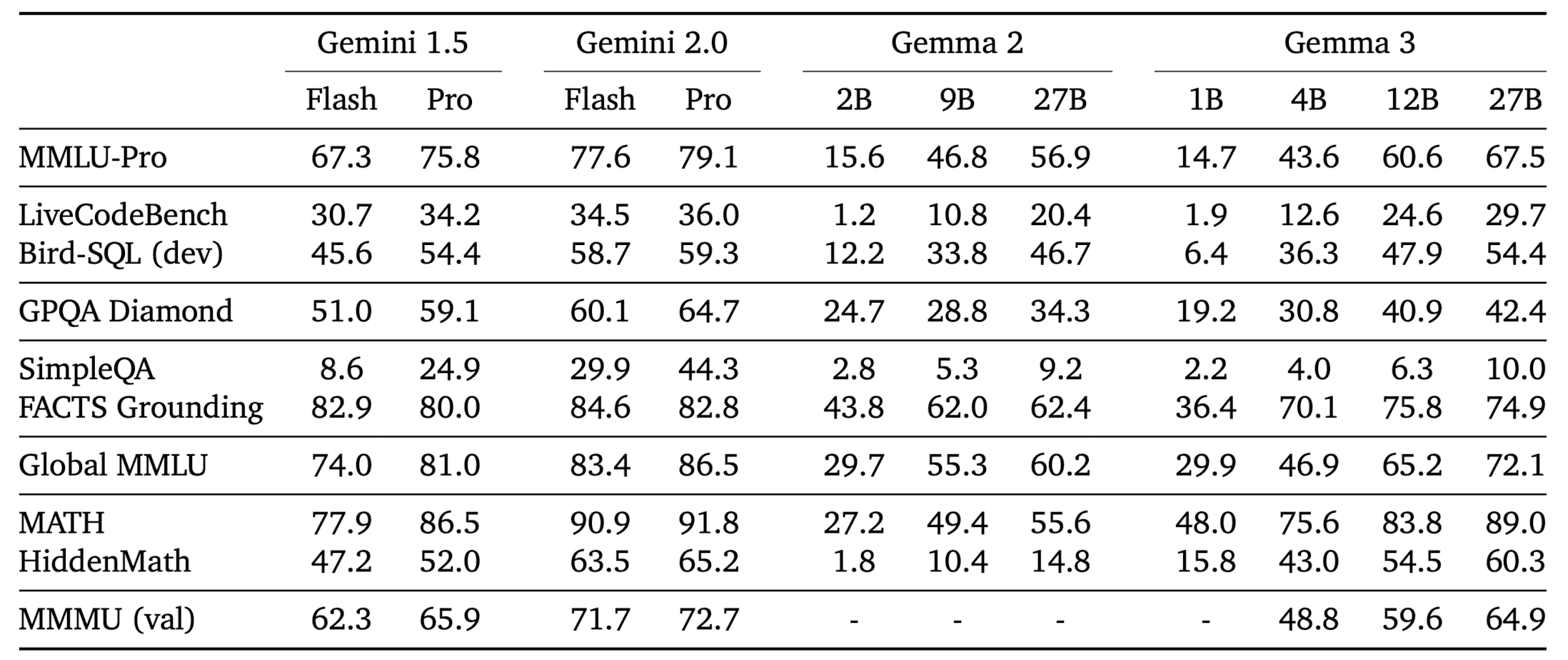
Both pre-trained and instruction tuned models are released. Gemma-3-4B-IT beats Gemma-2-27B IT, while Gemma-3-27B-IT beats Gemini 1.5-Pro across benchmarks .
What is Gemma 3?
Gemma 3 is Google's latest iteration of open weight LLMs. It comes in four sizes, 1 billion , 4 billion , 12 billion , and 27 billion parameters with base (pre-trained) and instruction-tuned versions. Gemma 3 goes multimodal ! The 4, 12, and 27 billion parameter models can process both images and text , while the 1B variant is text only .
The input context window length has been increased from Gemma 2’s 8k to 32k for the 1B variants, and 128k for all others. As is the case with other VLMs (vision-language models), Gemma 3 generates text in response to the user inputs, which may consist of text and, optionally, images. Example uses include question answering, analyzing image content, summarizing documents, etc.
While these are multimodal models, one can use it as a text only model (as an LLM) without loading the vision encoder in memory. We will talk about this in more detail later in the inference section.
Technical Enhancements in Gemma 3
The three core enhancements in Gemma 3 over Gemma 2 are:
- Longer context length
- Multimodality
- Multilinguality
In this section, we will cover the technical details that lead to these enhancements. It is interesting to start with the knowledge of Gemma 2 and explore what was necessary to make these models even better. This exercise will help you think like the Gemma team and appreciate the details!
Longer Context Length
Scaling context length to 128k tokens could be achieved efficiently without training models from scratch. Instead, models are pretrained with 32k sequences, and only the 4B, 12B, and 27B models are scaled to 128k tokens at the end of pretraining, saving significant compute. Positional embeddings, like RoPE, are adjusted—upgraded from a 10k base frequency in Gemma 2 to 1M in Gemma 3—and scaled by a factor of 8 for longer contexts.
KV Cache management is optimized using Gemma 2’s sliding window interleaved attention. Hyperparameters are tuned to interleave 5 local layers with 1 global layer (previously 1:1) and reduce the window size to 1024 tokens (down from 4096). Crucially, memory savings are achieved without degrading perplexity.
Multimodality
Gemma 3 models use SigLIP as an image encoder, which encodes images into tokens that are ingested into the language model. The vision encoder takes as input square images resized to 896x896 . Fixed input resolution makes it more difficult to process non-square aspect ratios and high-resolution images. To address these limitations during inference , the images can be adaptively cropped, and each crop is then resized to 896x896 and encoded by the image encoder. This algorithm, called pan and scan , effectively enables the model to zoom in on smaller details in the image.
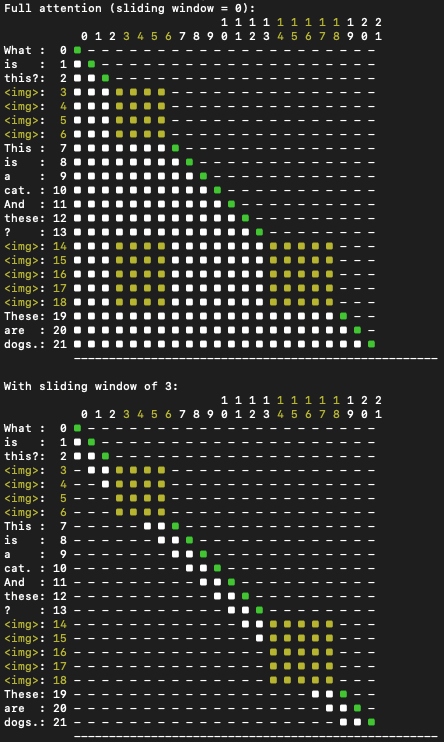
Similar to PaliGemma, attention in Gemma 3 works differently for text and image inputs. Text is handled with one-way attention, where the model focuses only on previous words in a sequence. Images, on the other hand, get full attention with no masks, allowing the model to look at every part of the image in a bidirectional manner, giving it a complete, unrestricted understanding of the visual input.
One can see in the figure below that the image tokens <img> are provided with bi-directional attention (the entire square is lit up) while the text tokens have causal attention. It also shows how attention works with the sliding window algorithm.
Multilinguality
To make a LLM multilingual, the pretraining dataset incorporates more languages. The dataset of Gemma 3 has double the amount of multilingual data to improve language coverage.
To account for the changes, the tokenizer is the same as that of Gemini 2.0. It is a SentencePiece tokenizer with 262K entries. The new tokenizer significantly improves the encoding of Chinese , Japanese and Korean text, at the expense of a slight increase of the token counts for English and Code.
For the curious mind, here is the technical report on Gemma 3 , to dive deep into the enhancements.
Gemma 3 evaluation
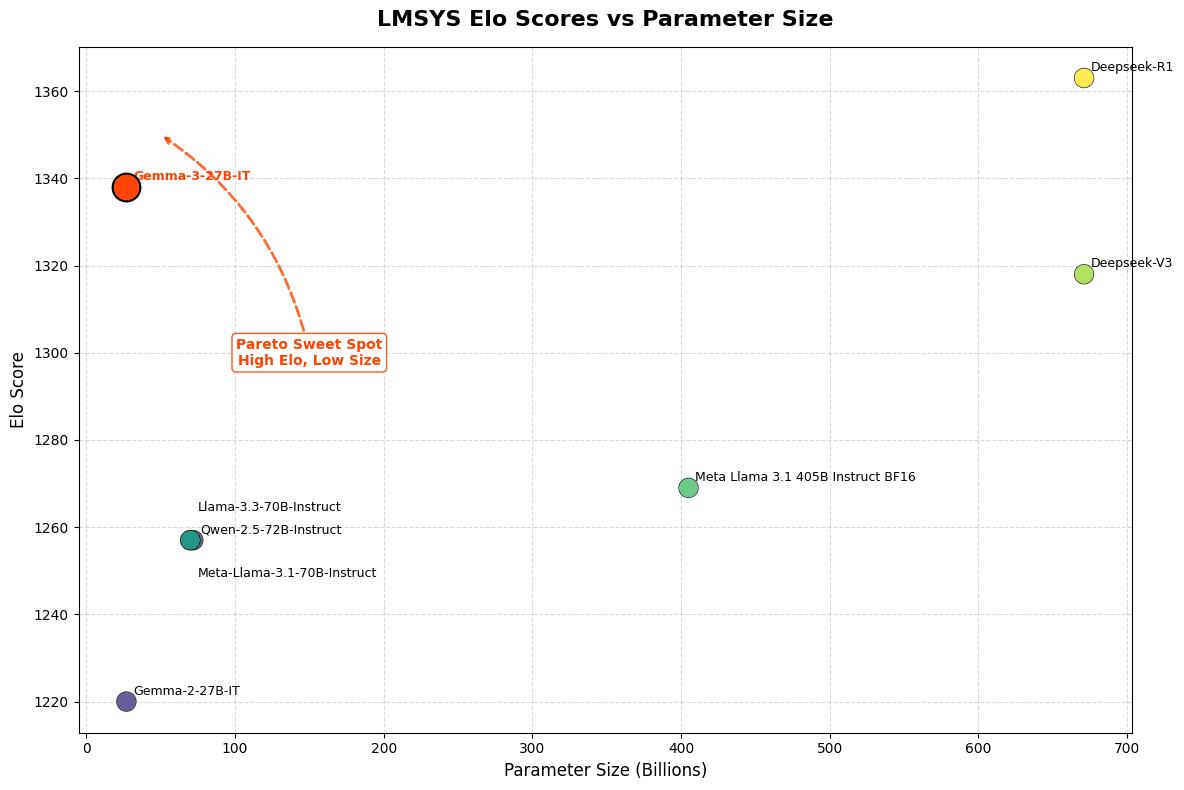
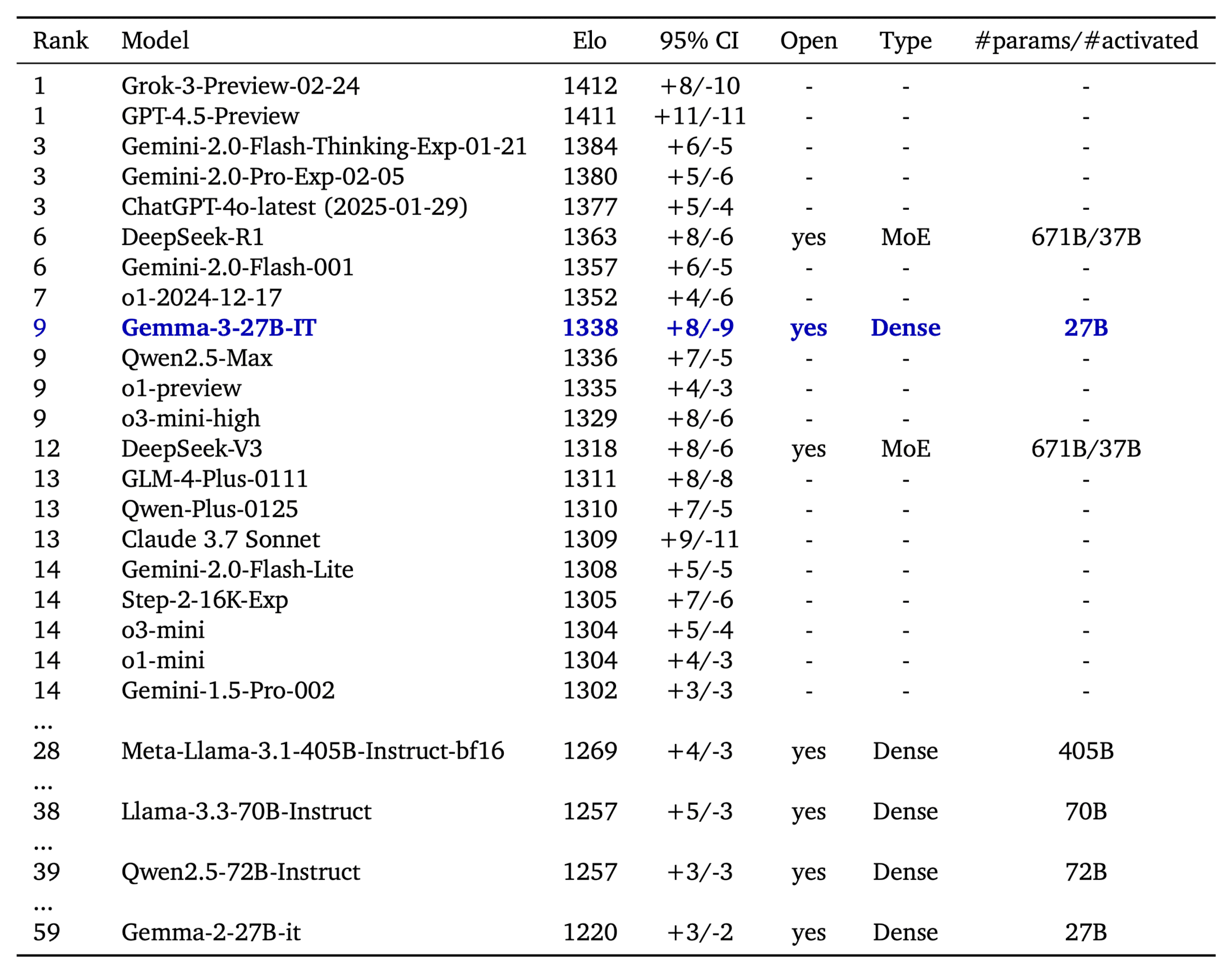
The LMSys Elo score is a number that ranks language models based on how well they perform in head-to-head competitions, judged by human preferences. On LMSys Chatbot Arena, Gemma 3 27B IT reports an Elo score of 1339 , and ranks among the top 10 best models, including leading closed ones. The Elo is comparable to o1-preview and is above other non-thinking open models. This score is achieved with Gemma 3 working on text-only inputs, like the other LLMs in the table.
Gemma 3 has been evaluated across benchmarks like MMLU-Pro (27B: 67.5), LiveCodeBench (27B: 29.7), and Bird-SQL (27B: 54.4), showing competitive performance compared to closed Gemini models. Tests like GPQA Diamond (27B: 42.4) and MATH (27B: 69.0) highlight its reasoning and math skills, while FACTS Grounding (27B: 74.9) and MMMU (27B: 64.9) demonstrate strong factual accuracy and multimodal abilities. However, it lags in SimpleQA (27B: 10.0) for basic facts. When compared to Gemini 1.5 models, Gemma 3 is often close—and sometimes better—proving its value as an accessible, high-performing option.
Inference with 🤗 transformers
Gemma 3 comes with day zero support in transformers . All you need to do is install transformers from the stable release of Gemma 3.
$ pip install git+https://github.com/huggingface/transformers@v4.49.0-Gemma-3Inference with pipeline
The easiest way to get started with Gemma 3 is using the pipeline abstraction in transformers.
The models work best using the bfloat16 datatype. Quality may degrade otherwise.
import torch
from transformers import pipeline

pipe = pipeline(
    "image-text-to-text",
    model="google/gemma-3-4b-it", # "google/gemma-3-12b-it", "google/gemma-3-27b-it"
    device="cuda",
    torch_dtype=torch.bfloat16
)

messages = [
    {
        "role": "user",
        "content": [
            {"type": "image", "url": "https://huggingface.co/datasets/huggingface/documentation-images/resolve/main/p-blog/candy.JPG"},
            {"type": "text", "text": "What animal is on the candy?"}
        ]
    }
]

output = pipe(text=messages, max_new_tokens=200)
print(output[0]["generated_text"][-1]["content"])
You can interleave images with text. To do so, just cut off the input text where you want to insert an image, and insert it with an image block like the following.
messages = [
        {
            "role": "system",
            "content": [{"type": "text", "text": "You are a helpful assistant."}]
        },
        {
            "role": "user",
            "content": [
                {"type": "text", "text": "I'm already using this supplement "},
                {"type": "image", "url": "https://huggingface.co/datasets/merve/vlm_test_images/resolve/main/IMG_3018.JPG"},
                {"type": "text", "text": "and I want to use this one too "},
                {"type": "image", "url": "https://huggingface.co/datasets/merve/vlm_test_images/resolve/main/IMG_3015.jpg"},
                {"type": "text", "text": " what are cautions?"},
            ]
        },

    ]
Detailed Inference with Transformers
The transformers integration comes with two new model classes:
- Gemma3ForConditionalGeneration : For 4B, 12B, and 27B vision language models.
- Gemma3ForCausalLM : For the 1B text only model and to load the vision language models like they were language models (omitting the vision tower).
In the snippet below we use the model to query on an image. The Gemma3ForConditionalGeneration class is used to instantiate the vision language model variants. To use the model we pair it with the AutoProcessor class. Running inference is as simple as creating the messages dictionary, applying a chat template on top, processing the inputs and calling model.generate .
import torch
from transformers import AutoProcessor, Gemma3ForConditionalGeneration

ckpt = "google/gemma-3-4b-it"
model = Gemma3ForConditionalGeneration.from_pretrained(
    ckpt, device_map="auto", torch_dtype=torch.bfloat16,
)
processor = AutoProcessor.from_pretrained(ckpt)

messages = [
    {
        "role": "user",
        "content": [
            {"type": "image", "url": "https://huggingface.co/spaces/big-vision/paligemma-hf/resolve/main/examples/password.jpg"},
            {"type": "text", "text": "What is the password?"}
        ]
    }
]
inputs = processor.apply_chat_template(
    messages, add_generation_prompt=True, tokenize=True,
    return_dict=True, return_tensors="pt"
).to(model.device)

input_len = inputs["input_ids"].shape[-1]

generation = model.generate(**inputs, max_new_tokens=100, do_sample=False)
generation = generation[0][input_len:]

decoded = processor.decode(generation, skip_special_tokens=True)
print(decoded)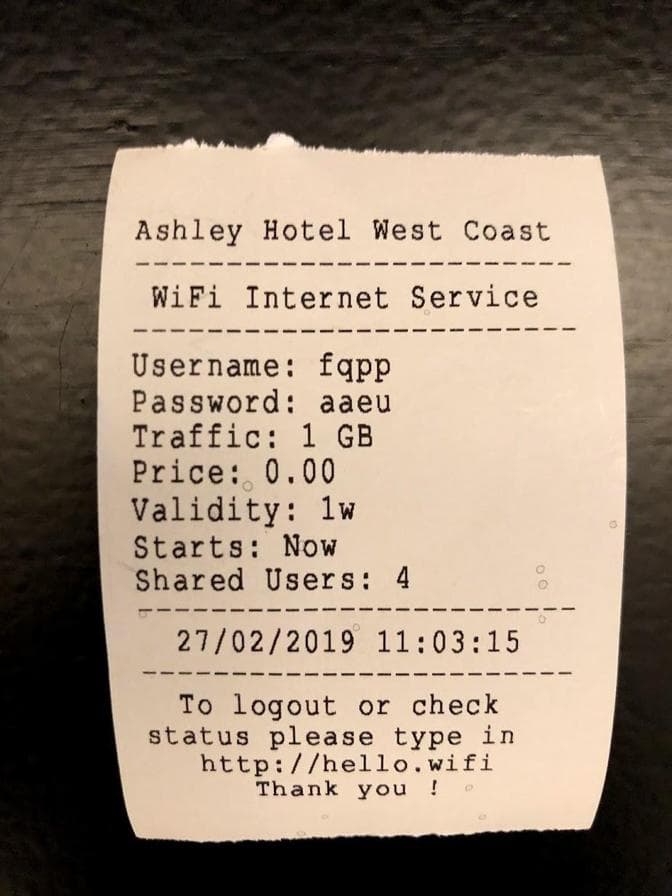
For LLM-only model inference, we can use the Gemma3ForCausalLM class. Gemma3ForCausalLM should be paired with AutoTokenizer for processing. We need to use a chat template to preprocess our inputs. Gemma 3 uses very short system prompts followed by user prompts like below.
import torch
from transformers import AutoTokenizer, Gemma3ForCausalLM

ckpt = "google/gemma-3-4b-it"
model = Gemma3ForCausalLM.from_pretrained(
    ckpt, torch_dtype=torch.bfloat16, device_map="auto"
)
tokenizer = AutoTokenizer.from_pretrained(ckpt)

messages = [
    [
        {
            "role": "system",
            "content": [{"type": "text", "text": "You are a helpful assistant who is fluent in Shakespeare English"},]
        },
        {
            "role": "user",
            "content": [{"type": "text", "text": "Who are you?"},]
        },
    ],
]
inputs = tokenizer.apply_chat_template(
    messages, add_generation_prompt=True, tokenize=True,
    return_dict=True, return_tensors="pt"
).to(model.device)

input_len = inputs["input_ids"].shape[-1]

generation = model.generate(**inputs, max_new_tokens=100, do_sample=False)
generation = generation[0][input_len:]

decoded = tokenizer.decode(generation, skip_special_tokens=True)
print(decoded)
On Device & Low Resource Devices
Gemma 3 is released with sizes perfect for on-device use. This is how to quickly get started.
MLX
Gemma 3 ships with day zero support in mlx-vlm , an open source library for running vision language models on Apple Silicon devices, including Macs and iPhones
To get started, first install mlx-vlm with the following:
pip install git+https://github.com/Blaizzy/mlx-vlm.gitOnce mlx-vlm is installed, you can start inference with the following:
python -m mlx_vlm.generate --model mlx-community/gemma-3-4b-it-4bit --max-tokens 100 --temp 0.0 --prompt "What is the code on this vehicle??"
 --image https://farm8.staticflickr.com/7212/6896667434_2605d9e181_z.jpg
Llama.cpp
Pre-quantized GGUF files can be downloaded from this collection
Please refer to this guide for building or downloading pre-built binaries: https://github.com/ggml-org/llama.cpp?tab=readme-ov-file#building-the-project
Then you can run a local chat server from your terminal:
./build/bin/llama-cli -m ./gemma-3-4b-it-Q4_K_M.ggufIt should output:
> who are you
I'm Gemma, a large language model created by the Gemma team at Google DeepMind. I’m an open-weights model, which means I’m widely available for public use!
Deploy on Hugging Face Endpoints
You can deploy gemma-3-27b-it and gemma-3-12b-it with just one click from our Inference Catalog. The catalog configurations have the right hardware, optimized TGI configurations and sensible defaults for trying out a model. Deploying any GGUF/llama.cpp variant is also supported (for example the ones mentioned in the collection above) and you'll find a guide on creating an Endpoint here .
Acknowledgements
It takes a village to raise a gemma! We’d like to thank (in no particular order), Raushan, Joao, Lysandre, Kashif, Matthew, Marc, David, Mohit, Yih Dah for their efforts integrating Gemma into various parts of our open source stack from Transformers to TGI. Thanks to our on-device, gradio and advocacy teams - Chris, Kyle, Pedro, Son, Merve, Aritra, VB, Toshiro for helping build kick-ass demos to showcase Gemma.
Lastly, a big thank you to Georgi, Diego and Prince for their help with llama.cpp and MLX ports.
Models mentioned in this article 8
Collections mentioned in this article 3
More Articles from our Blog
mmBERT: ModernBERT goes Multilingual
- +2
Ettin Suite: SoTA Paired Encoders and Decoders
- +2
Community
I'll wait for a Fireship video.
- 3 replies
no video by fireship

Nice!
Looking forward to see it available for Ollama!
- 2 replies
already available in Ollama
At last, this is the poetic return I long awaited from Google.

Sounds amazing 😘
Unable to create sagemaker endpoint from this.
I don't why, but on my macos I can't run it... ``` python -m mlx_vlm.generate --model mlx-community/gemma-3-4b-it-4bit --max-tokens 100 --temperature 0.0 --prompt "Describe this image." --image https://farm8.staticflickr.com/7212/6896667434_2605d9e181_z.jpg None of PyTorch, TensorFlow >= 2.0, or Flax have been found. Models won't be available and only tokenizers, configuration and file/data utilities can be used. None of PyTorch, TensorFlow >= 2.0, or Flax have been found. Models won't be available and only tokenizers, configuration and file/data utilities can be used. Fetching 9 files: 100%|████████████████████████████████████████████████████| 9/9 [00:00<00:00, 90742.15it/s]
Files: [' https://farm8.staticflickr.com/7212/6896667434_2605d9e181_z.jpg']
Prompt: Describe this image. Traceback (most recent call last): File "", line 198, in _run_module_as_main File "", line 88, in _run_code File "/Users/xxxxxx/Projects/mlx/venv-3.12/lib/python3.12/site-packages/mlx_vlm/generate.py", line 156, in main() File "/Users/xxxxx/Projects/mlx/venv-3.12/lib/python3.12/site-packages/mlx_vlm/generate.py", line 141, in main output = generate( ^^^^^^^^^ File "/Users/xxxx/Projects/mlx/venv-3.12/lib/python3.12/site-packages/mlx_vlm/utils.py", line 1117, in generate for response in stream_generate(model, processor, prompt, image, **kwargs): ^^^^^^^^^^^^^^^^^^^^^^^^^^^^^^^^^^^^^^^^^^^^^^^^^^^^^^^^^^ File "/Users/xxxx/Projects/mlx/venv-3.12/lib/python3.12/site-packages/mlx_vlm/utils.py", line 1018, in stream_generate inputs = prepare_inputs( ^^^^^^^^^^^^^^^ File "/Users/xxxx/Projects/mlx/venv-3.12/lib/python3.12/site-packages/mlx_vlm/utils.py", line 814, in prepare_inputs inputs = processor( ^^^^^^^^^^ File "/Users/xxxxx/Projects/mlx/venv-3.12/lib/python3.12/site-packages/transformers/tokenization_utils_base.py", line 2877, in call encodings = self._call_one(text=text, text_pair=text_pair, **all_kwargs) ^^^^^^^^^^^^^^^^^^^^^^^^^^^^^^^^^^^^^^^^^^^^^^^^^^^^^^^^^^^^ File "/Users/xxxx/Projects/mlx/venv-3.12/lib/python3.12/site-packages/transformers/tokenization_utils_base.py", line 2987, in _call_one return self.encode_plus( ^^^^^^^^^^^^^^^^^ File "/Users/xxxx/Projects/mlx/venv-3.12/lib/python3.12/site-packages/transformers/tokenization_utils_base.py", line 3063, in encode_plus return self._encode_plus( ^^^^^^^^^^^^^^^^^^ File "/Users/xxxx/Projects/mlx/venv-3.12/lib/python3.12/site-packages/transformers/tokenization_utils_fast.py", line 613, in _encode_plus batched_output = self._batch_encode_plus( ^^^^^^^^^^^^^^^^^^^^^^^^ TypeError: PreTrainedTokenizerFast._batch_encode_plus() got an unexpected keyword argument 'images' ```
- 3 replies
Well the traceback is kind of self explanatory, is it not?
Any fine-tuning notebook already available?

Is there any example notebook for fine-tuning image-text pairs or image-dialogue with Gemma 3?
- 1 reply
check out unsloth, they have integration for it
VLM fine-tuning examples by @ sergiopaniego here: https://x.com/SergioPaniego/status/1904936230644490751
how to use gemma 3 with langchain and get image description by passing image_url as input ? anyone please help!

Thanks for the article! I have a full tutorial about Gemma here https://youtu.be/_IzgKu0xnmg?si=BMnYf_E5V5wrGuZC ;)
I documented my exploration with the Gemma 3 model here: https://entron.github.io/posts/Try-Gemma3-using-Hugging-Face-Part-1/ I’m sharing it in case it might help someone else too.

We've created a complete Fine-tuning a Multimodal Model Using SFT (Single or Multi-Image Dataset) guide using Gemma 3, in case you're intereseted!

It's the most powerful open LLM I've ever used (for research). Great thanks!!
Complete garbage. Incapable of identifying what are letters and what are numerals. Incapable of counting characters. Incapable of reevaluating responses for accuracy. Incapable of keeping track of previously corrected errors. This is the worst LLM I've seen in a long time.

Is it possible to use a prompt template with multiple images, and if so how many?

We have a problem:
[09:38:27] <RoLex> 247GPT: 1 + 91919191 ?
[09:38:28] <247GPT> RoLex: 92000000
[09:38:45] <RoLex> wth..
[09:38:56] <RoLex> 247GPT: 1 + 91919191 ??
[09:38:58] <247GPT> RoLex: 92000000
[09:39:13] <RoLex> 247GPT: 1 + 91919191 ? are you dumb ?
[09:39:14] <247GPT> RoLex: 92000000
[09:39:19] <RoLex> lol
gemma3:4b using Ollama. How is this possible?
· Sign up or log in to comment
- +483