Turn your best AI prompts into one-click tools in Chrome
Apr 14, 2026
Skills in Chrome let you discover, save and remix AI workflows — and repeat them instantly.

Your browser does not support the audio element.
People are using AI in Chrome to help them get more done on the web — whether that’s answering questions, comparing information or clarifying concepts.
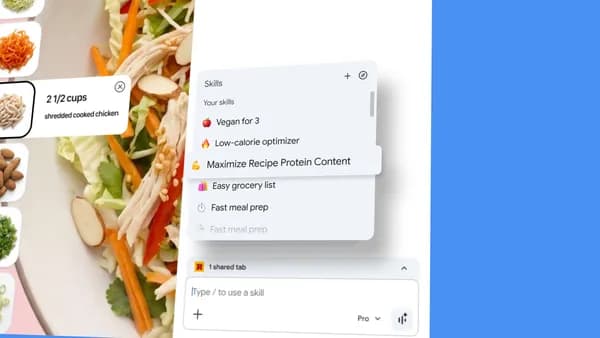
Until now, repeating an AI task — like asking for ingredient substitutions to make a recipe vegan — meant re-entering the same prompt as you visited different pages. To make this easier, we’re launching Skills in Chrome, which lets you save and reuse your most helpful AI prompts and run them with a single click.
Build your own one-click workflows
When you write a prompt that you’ll want to use again, you can save it as a Skill directly from your chat history. The next time you need it, select your saved Skill in Gemini in Chrome by typing forward slash ( / ) or clicking the plus sign ( + ) button, and your Skill will run on the page you’re viewing, along with any other tabs you select. You can edit your saved Skills and create new ones at any time.
Early testers have used Skills in Chrome to create personalized and powerful workflows for a wide range of tasks. Here are just a few examples.
- Health & Wellness: quickly calculating protein macros for any recipe
- Shopping: generating side-by-side spec comparisons across multiple tabs
- Productivity: scanning lengthy documents for important information
Get started with our Skills library
We’re also launching a library of ready-to-use Skills for common tasks and workflows.

Want to break down the ingredients of a product you’re viewing online? Or select the perfect gift from multiple options by cross-referencing your budget with the recipient’s interests? We wrote Skills that do these things and more. If you find one that looks interesting, you can add it as a saved Skill and give it a try. And if you want to customize it to better fit your needs, you can edit the Skill and update the prompt.
Stay in control
Skills are built on Chrome’s foundation of security and privacy, and they utilize the same safeguards we apply to prompts in Gemini in Chrome. That means a Skills prompt will ask for confirmation before taking certain actions, such as adding an event to your calendar or sending an email. And Skills benefit from Chrome’s layered protections, including automated red-teaming and auto-update capabilities.
Starting today, we’re rolling out Skills to Gemini in Chrome on desktop 1 , helping you streamline your AI-powered browsing. Your saved Skills are available on any signed-in Chrome desktop device and can be managed by typing forward slash ( / ) in Gemini in Chrome and then clicking the compass icon.
Skills in Chrome are rolling out on Mac, Windows and ChromeOS to users with their Chrome language set to English-US.
Related stories

See what happens when creative legends use AI to make ads for small businesses.

5 gardening tips you can try right in Search
Approximate location sharing gives you more control over your location data in Chrome.

Google is partnering with XPRIZE and Range Media Partners on the $3.5 million Future Vision film competition.

The latest AI news we announced in April 2026