
Smol2Operator: Post-Training GUI Agents for Computer Use
- +132





TL;DR: This work shows how a lightweight vision–language model can acquire GUI-grounded skills and evolve into an agentic GUI coder. We release all training recipes, data-processing tools, resulting model, demo and datasets to enable full reproducibility and foster further research 🫡. Find the collection here .
Table of Contents
- Introduction
- 1. Data Transformation and Unified Action Space The Challenge of Inconsistent Action Spaces
- Our Unified Approach
- Example Data Transformation
- Custom Action Space Adaptation with Action Space Converter
- Key Features
- Usage Example
- Transformed and Released Datasets
- Training Data
- Optimization Experiments
- Image Resolution and Coordinate System Analysis
- Key Findings
- Phase 1 Results
- Training Data
- Phase 2 Results
Introduction
Graphical User Interface (GUI) automation is one of the most challenging frontiers in computer vision. Developing models that see and interact with user interfaces enables AI agents to navigate mobile, desktop, and web platforms. This will reshape the future of digital interaction.
In this blog post, we present a comprehensive approach to training vision-language models for GUI automation through a multi-phase training strategy. We demonstrate how to transform a model with zero grounding capabilities into an agentic coder capable of understanding and interacting with graphical interfaces.
Rather than aiming for a SOTA model, our goal is to demonstrate the entire process, from data processing to model training, and, in doing so, show how to unlock GUI-grounding capabilities in VLMs.
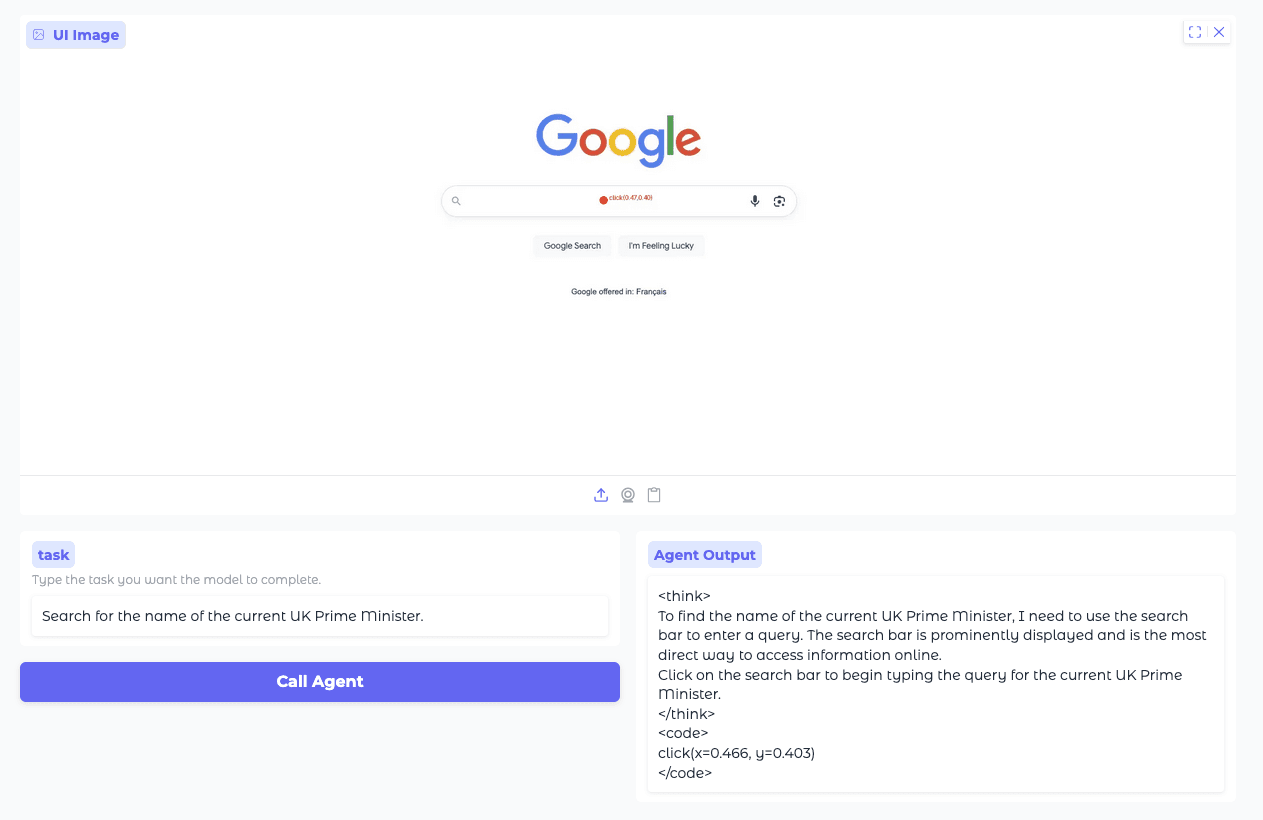
GUI capabilities combine understanding of the interface and precise element localization. These abilities enable the model to translate high-level tasks into low-level GUI actions such as clicking, typing, …
Our approach leverages SmolVLM2-2.2B-Instruct as the baseline model, a small powerful vision-language model that initially has no grounding capabilities for GUI tasks. This makes it an ideal candidate to demonstrate the effectiveness of our training methodology. Through our two-phase training process, we first instill grounding capabilities in the model, then enhance it with agentic reasoning abilities using Supervised Fine-Tuning (SFT).
We evaluate our approach on an established perception benchmark: ScreenSpot-v2 , which tests the model’s ability to understand and locate elements within screenshots. Our process is inspired by the AGUVIS paper, and we leverage their carefully curated datasets to build upon their foundational work.
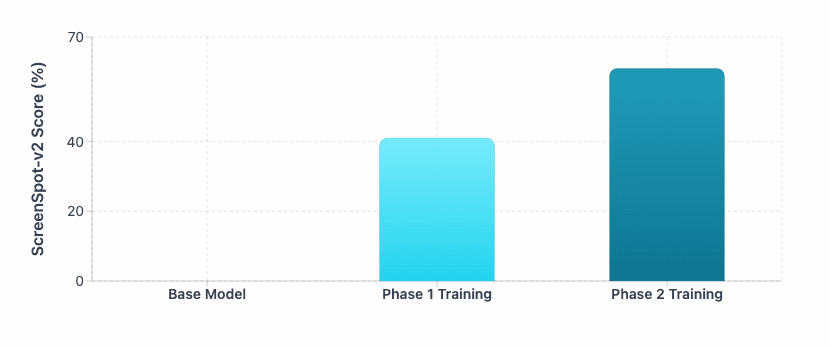
Evolution of ScreenSpot-v2 performance during the training phase of the base model SmolVLM2-2.2B-Instruct .
1. Data Transformation and Unified Action Space
This section explains how we convert heterogeneous GUI actions format from multiple datasets into a single unified format . By standardizing function names, signatures, and parameters, we create consistent, high-quality data that forms the foundation for effective model training.
The Challenge of Inconsistent Action Spaces
One of the primary challenges when working with multiple GUI automation datasets is the lack of standardization in action representations. Different datasets use varying function signatures, parameter naming conventions, and action taxonomies, making it difficult to train a unified model across diverse data sources.
Our Unified Approach
We took the open-source datasets ( xlangai/aguvis-stage1 , xlangai/aguvis-stage2 ), originally used by AGUVIS , and implemented a comprehensive data transformation pipeline to create a unified action space. Our approach involved:
- Function Parsing and Normalization : We developed a function parser (see utils/function_parser.py ) that can extract and parse function calls from various formats across all datasets. This parser supports any function signature format, handles complex parameter structures, and can reconstruct function calls with proper parameter ordering.
- Action Space Unification : We implemented a comprehensive action conversion system (see preprocessing/action_conversion.py ) that transforms all original action representations into a standardized function naming and argument structure. This process highlighted the significant inconsistencies in function signatures across different datasets and allowed us to: Remove undesired or redundant actions
- Standardize parameter naming conventions
- Create a cohesive action vocabulary
- Adapt the entire dataset to their own action space naming conventions using the utils/action_space_converter.py tool
- Extract and analyze the current action space structure
Example Data Transformation
Here are real examples from our action conversion system ( preprocessing/action_conversion.py ) showing how we transform heterogeneous action representations into our unified format (grounding coordinates normalized to [0,1]):
Before (Original Action Dataset Formats):
# Mobile Actions
mobile.home()
mobile.open_app(app_name='drupe')
mobile.swipe(from_coord=[0.581, 0.898], to_coord=[0.601, 0.518])
mobile.long_press(x=0.799, y=0.911)
mobile.terminate(status='success')
# Desktop Actions
pyautogui.click(x=0.8102, y=0.9463)
pyautogui.doubleClick(x=0.8102, y=0.9463)
pyautogui.hotkey(keys=['ctrl', 'c'])
pyautogui.scroll(page=-0.1)
pyautogui.write(message='bread buns')
pyautogui.dragTo(from_coord=[0.87, 0.423], to_coord=[0.8102, 0.9463])
After (Unified Action Dataset Formats):
# Unified Mobile Actions
navigate_home()
open_app(app_name='drupe')
swipe(from_coord=[0.581, 0.898], to_coord=[0.601, 0.518])
long_press(x=0.799, y=0.911)
final_answer('success')
# Unified Desktop Actions
click(x=0.8102, y=0.9463)
double_click(x=0.8102, y=0.9463)
press(keys=['ctrl', 'c'])
scroll(direction='up', amount=10)  # Smart direction detection
type(text='bread buns')
drag(from_coord=[0.87, 0.423], to_coord=[0.8102, 0.9463])
This unification process was essential for creating coherent training data that allows the model to learn consistent action patterns across diverse GUI environments.
(Bonus) Custom Action Space Adaptation with Action Space Converter
To maximize flexibility for different use cases, we developed the Action Space Converter ( utils/action_space_converter.py ), a tool that allows users to easily adapt from an action space to their own custom action vocabularies and naming conventions.
You can use this tool to transform one action signature (function names, parameter names, and parameter value changes, ...) into another:
Before
assistant_message: "Action: click(x=0.5, y=0.3)"After
assistant_message: "Action: touch(x_coord=200, y_coord=300)"Key Features
The Action Space Converter provides:
- Configurable Mappings : Define custom mappings between unified actions and your preferred action names
- Parameter Transformation : Rename parameters, apply value transformations, and set default values
- Flexible Architecture : Support for both simple parameter mappings and complex custom transformation functions
- Validation : Built-in validation to ensure mapping configurations are valid
Usage Example
from utils.action_space_converter import ActionSpaceConverter, ActionMapping, ParameterMapping
from utils.function_parser import parse_function_call

# Create custom mappings
mappings = [
    ActionMapping(
        source_function="click",
        target_function="touch",
        parameter_mappings=[
            ParameterMapping(source_name="x", target_name="x_coord"),
            ParameterMapping(source_name="y", target_name="y_coord")
        ],
        description="Touch screen at coordinates"    ),
    ActionMapping(
        source_function="type", # source_function is the name of the function in the original function call
        target_function="write", # target_function is the name of the function in the target function call
        parameter_mappings=[
            ParameterMapping(source_name="text", target_name="content")
            # source_name is the name of the parameter in the original function call
            # target_name is the name of the parameter in the target function call
        ],
        description="Input text"
    )
]

assistant_message = "I'll interact at those coordinates for you. click(x=0.5, y=0.3) Now I'll input the text. type(text='hello world')"

# Parse function calls
parsed_function_calls = parse_function_call(text)

# Initialize converter
converter = ActionSpaceConverter(mappings)

# Convert actions
converted_actions = converter.convert_actions(parsed_function_calls)
for new_function_call, old_function_call in zip(converted_actions, parsed_function_calls):
    text = text.replace(old_function_call.to_string(), new_function_call.to_string())

print(text)
# Output: I'll interact at those coordinates for you. touch(x_coord=0.5, y_coord=0.3) Now I'll input the text. write(content='hello world')
This tool enables researchers and practitioners to:
- Customize Training Data : Adapt the dataset to match their specific action vocabulary requirements
- Domain Adaptation : Transform actions for different platforms (mobile vs. desktop vs. web)
- Framework Integration : Easily align training data with existing automation frameworks
- Rapid Experimentation : Quickly test different action space configurations
- Release Preparation : Standardize action spaces for production deployment with consistent naming conventions
The Action Space Converter is particularly valuable for preparing datasets for training, as it ensures consistent action vocabularies across different deployment environments while maintaining compatibility with existing automation frameworks.
Transformed and Released Datasets
Through this pipeline, we transform the open-source datasets xlangai/aguvis-stage1 , xlangai/aguvis-stage2 into our unified action space (see here ). The output of this process is released as two new fully formatted datasets: smolagents/aguvis-stage-1 and smolagents/aguvis-stage-2 .
2. Phase 1: From Zero to Perception
Training Data
Phase 1 leverages the smolagents/aguvis-stage-1 dataset, which introduces GUI grounding by pairing low-level instructions with diverse executable actions (expressed in code form). For example, a user/assistant turn in smolagents/aguvis-stage-1 follows the structure:
{
  "user": "click on more button",
  "assistant": "click(x=0.8875, y=0.2281)",
}
Each sample links a screenshot with multi-turn user/assistant interactions, enabling the model to learn fine-grained action grounding across dialogue turns. During fine-tuning, the data collator masks everything except the assistant’s answers when computing the loss.
Optimization Experiments
Before proceeding with full-scale Phase 1 training, we conducted comprehensive ablation studies to determine optimal training configurations
Image Resolution and Coordinate System Analysis
We experimented with different image sizes and coordinate representation systems to identify the optimal configuration for SmolVLM2:
- Image Sizes Tested : 384px, 768px, 1152px
- Coordinate Systems : Pixel coordinates vs. normalized coordinates (0-1 range)
- Training Data : 400K samples from Aguvis datasets
Some SOTA GUI VLMs (e.g., Qwen-VL) appear also to use a different normalized range (0–1000), which was not tested in this experiment.
Table 1: Baseline on HuggingFaceTB/SmolVLM2-2.2B-Instruct (400k samples, aguvis-stage-1). Higher is better.
As demonstrated in our benchmark results, SmolVLM2-2.2B-Instruct base initially achieved 0% performance on perception benchmarks like ScreenSpot-v2. This complete lack of grounding capability provided us with a clean slate to evaluate the effectiveness of our training methodology.
Key Findings
From our experiments, we determined that:
- Image Size : 1152px
- Coordinate System : Normalized coordinates (0-1 range) proved most effective for SmolVLM2
- Note: The optimal choice between pixel and normalized coordinates may vary depending on the base model’s pre-training approach
Phase 1 Results
Using the optimal configuration (1152px resolution with normalized coordinates), we trained for 2 epochs on the smolagents/aguvis-stage-1 dataset. The results were remarkable, +41% improvement over baseline on ScreenSpot-v2
This dramatic improvement demonstrates that our Phase 1 training successfully instilled fundamental grounding capabilities in the model, enabling it to understand and locate visual elements within screenshots.
Table 2: Baseline on HuggingFaceTB/SmolVLM2-2.2B-Instruct (2 epochs, aguvis-stage-1).
3. Phase 2: From Perception to Cognition
Whereas Phase 1 provided grounding capabilities, Phase 2 targets agentic reasoning, the ability to deliberate and plan before acting. This stage transforms the model from a reactive system identifying GUI elements into a proactive agent capable of executing complex, multi-step interactions.
Training Data
Phase 2 uses the smolagents/aguvis-stage-2 dataset, which introduces agentic scenarios:
- Explicit reasoning about upcoming actions
- Context consistency across multiple interaction steps
- High-level instructions require multi-step, low-level actions.
For example, the smolagents/aguvis-stage-2 chat message is like this:
{
  "system": "You are a helpful GUI agent. ...",
  "user": "Please generate the next move according to the UI screenshot, instruction and previous actions.\n\nInstruction: What information does the site provide about Judith Lauand's career, works and exhibitions?\n\nPrevious actions:\nNone",
  "assistant": "<think>\nClick on the link labeled 'Judith Lauand: Brazilian 1922-2022' to explore more about her career and exhibitions.\n</think>\n<code>\nclick(x=0.41, y=0.178)\n</code>",
}
Each sample links a screenshot with a system/user/assistant turn. During fine-tuning, the data collator masks everything except the assistant’s answers when computing the loss.
Phase 2 Results
Starting from the Phase 1 checkpoint (1152 px resolution, normalized coordinates), we fine-tuned the model for two epochs on smolagents/aguvis-stage-2 . The accuracy on ScreenSpot-v2 increased from 41% to 61% , indicating that explicit reasoning improves GUI grounding performance.
Table 2: Baseline on HuggingFaceTB/SmolVLM2-2.2B-Instruct after Phase 1 finetuning (2 epochs, aguvis-stage-1).
4. All you need is Open Source
All training code, data processing pipelines, datasets and model are open-source!
- Training Recipe ( recipe.ipynb ): Complete training pipeline for both Phase 1 and Phase 2, including dataset mixture configurations and training orchestration. We leverage the TRL library to train our models.
- Datasets ( smolagents/aguvis-stage-1 , smolagents/aguvis-stage-2 ): all datasets used are open-source.
- Model ( smolagents/SmolVLM2-2.2B-Instruct-Agentic-GUI ): the model produced by applying the training recipe described above.
- Preprocessing Tools: Function Parser ( utils/function_parser.py ): Utilities for parsing, normalizing, and reconstructing function calls from diverse dataset formats. Supports complex parameter structures, positional arguments, and multiple function call extraction.
- Action Conversion System ( preprocessing/action_conversion.py ): Core unification engine transforming mobile and PyAutoGUI desktop actions into a standardized API format. Features smart coordinate handling, direction detection for scroll actions, and comprehensive parameter normalization.
- Action Space Converter ( utils/action_space_converter.py ): Flexible tool for adapting the unified action space to custom vocabularies and naming conventions. Enables domain-specific customization through configurable parameter mappings.
5. Conclusion
Our experiments demonstrate that high-quality, reasoning-oriented data can substantially improve GUI grounding, even for small VLMs, using only supervised fine-tuning (SFT). Beyond raw performance gains, these results show that the GUI grounding capabilities are largely determined by the quality of the data. Carefully curated datasets teach models the structure and semantics of user interfaces, providing the grounding needed for accurate action prediction.
To support the development of GUI agents, we’re open-sourcing everything: our complete pipeline, datasets, and trained model. You can reproduce our results, experiment with different models and architectures, or adapt our approach to new domains. The future of agentic AI depends on researchers like you pushing these boundaries further!
What's Next?
While SFT excels at supervised tasks, emerging methods such as Reinforcement Learning (RL) or Direct Preference Optimization (DPO) help develop stronger reasoning capabilities and enable real-time adaptation. These advances point toward a new generation of GUI agents that learn and improve through interaction rather than relying solely on static datasets.
Let’s build the future of GUI agents together 🤗
Models mentioned in this article 2
Datasets mentioned in this article 5
Papers mentioned in this article 1
Collections mentioned in this article 1
More Articles from our Blog
Codex is Open Sourcing AI models
We Got Claude to Fine-Tune an Open Source LLM
Community

thanks 🤗

how do we use it for mobile devices offline ?
FYI, we just released a model based on the little one SmolVLM2-500M, pushing ScreenspotV2 to 85.8 ! https://huggingface.co/vocaela/Vocaela-500M
can this be converted into GGUF or any other format to run on mobile devices ?
- 1 reply
Haven't converted yet. It hasn't changed arch or config of the base model (HuggingFaceTB/SmolVLM2-500M-Video-Instruct). I converted SmolVLM2-500M-Video-Instruct to gguf before using the tool provided in llamacpp codebase. So I suppose it can be converted smoothly -- but haven't done it this time.
ok, i have found something, VLM are like taking 1 min to decode the tokens and Images so i guess it is a terrible idea (for now) : )
I am fine tuning smolvlm-256m for the gui/mobile operation based on datasets mentioned in the article https://huggingface.co/datasets/smolagents/aguvis-stage-1 & https://huggingface.co/datasets/smolagents/aguvis-stage-2 but below code function from https://github.com/huggingface/smol2operator/blob/main/recipe.ipynb is causing the training to go for more than 10 days , is there any way to optimize the collate_fn function !!? I am planning to release model in opensource after training thanks !
def create_collate_fn(processor, max_length: int): """Optimized collate function for VLM training that masks system prompt tokens."""
def collate_fn(examples: list[dict[str, list | str | Image.Image]]):
    batch_messages: list[list[dict[str, list | str | Image.Image]]] = []
    assistant_messages: list[list[str]] = []
    all_image_inputs: list[list[Image.Image]] = []
    for example in examples:
        images: list[Image.Image] = example["images"]
        is_first_user = True
        sample: list[dict[str, list | str | Image.Image]] = []
        assistant: list[str] = []
        for text in example["texts"]:
            if "system" in text.keys():
                sample.append(
                    {
                        "role": "system",
                        "content": [{"type": "text", "text": text["system"]}],
                    }
                )

            if is_first_user:
                sample.append(
                    {
                        "role": "user",
                        "content": [
                            {"type": "image", "image": images[0]},
                            {"type": "text", "text": text["user"]},
                        ],
                    }
                )
                is_first_user = False
            else:
                sample.append(
                    {
                        "role": "user",
                        "content": [
                            {"type": "text", "text": text["user"]},
                        ],
                    }
                )

            sample.append(
                {
                    "role": "assistant",
                    "content": [{"type": "text", "text": "\n" + text["assistant"]}],
                }
            )
            assistant.append(text["assistant"])

        batch_messages.append(sample)
        assistant_messages.append(assistant)
        all_image_inputs.append(images)

    texts = [
        processor.apply_chat_template(
            messages, tokenize=False, add_generation_prompt=False
        )
        for messages in batch_messages
    ]

    batch = processor(
        text=texts,
        images=all_image_inputs if all_image_inputs else None,
        max_length=max_length,
        truncation=True,
        padding=True,
        return_tensors="pt",
    )

    input_ids = batch["input_ids"]
    labels = input_ids.clone()

    assistant_encodings = [
        processor.tokenizer(
            [msg + "" for msg in assistant_message],
            add_special_tokens=False,
            padding=False,
        )["input_ids"]
        for assistant_message in assistant_messages
    ]

    # Mask out all except the assistant messages
    for i, assistant_ids_list in enumerate(assistant_encodings):
        seq = input_ids[i].tolist()
        assistant_positions: list[int] = []
        for ids in assistant_ids_list:
            start_pos = 0
            while start_pos < len(seq) - len(ids) + 1:
                found = False
                for j in range(start_pos, len(seq) - len(ids) + 1):
                    if seq[j : j + len(ids)] == ids:
                        assistant_positions.extend(range(j, j + len(ids)))
                        start_pos = j + len(ids)
                        found = True
                        break
                if not found:
                    break

        for pos in range(len(seq)):
            if pos not in assistant_positions:
                labels[i, pos] = -100

    batch["labels"] = labels
    return batch

return collate_fn
can it be running on iOS device?
can we run it on android os ?
I created a model series, maybe close to, although not really tested on phones but on very old laptops. The latest one is Vocaela-2-500M-1024R2 , it has GGUF provided as well. 3x faster than its previous version Vocaela-500M
There is an even smaller 256M version as well Vocaela-2-256M-512R2 , speedwise much faster than the 500M ones (4-5x faster than Vocaela-2-500M-1024R2), however, quality not as good as them. Unfortunately, this one has no GGUF yet because LlamaCpp converted GGUF version's output is not consistent with the HF version. I am trying to figure out what happened there.
· Sign up or log in to comment
- +126